 Email:vip@taojiyun.com
- ID:17154831823
- VIP:淘集运会员
- User Center Log Out
- My Shopping Cart My Order
-
~ Empty ~
-
~ Empty ~
Email:vip@taojiyun.com
Taojiyun 2025-08-01 15:40:22 11100k 0 0 Logistics Information

Want to find high-quality and cost-effective items on the popular second-hand platform Xianyu APP in the Chinese mainland, but worry that Taiwanese users cannot place orders directly and the logistics is not guaranteed?
Don't worry! This article compiles a complete guide for Taiwanese users to use the Xianyu APP, covering everything from download and registration, real-name authentication, payment solutions, to the most practical processes of consolidated shipping and self-purchase, agency purchase and management, as well as tips to avoid pitfalls in second-hand transactions. It resolves all your concerns in one step, allowing you to fully enjoy the rich resources of the second-hand market in the Chinese mainland!
Download and Installation (Compatible for iOS and Android)
1.iOS users: Open the APP Store, search for Xianyu, and click to download. If you cannot find it, you can switch to a mainland ID (you need to register a mainland Apple ID in advance), or download the enterprise version through a trusted third-party platform (please verify the legitimacy of the platform).
2. Android users: Search for Xianyu through official channels such as Huawei AppGallery and Xiaomi App Store to download.
If you are unable to download, you can log in to the Xianyu official website, scan the QR code on the official website to download the installation package. When installing, enable the Installation from Unknown sources permission (only for trusted sources).
Registration and real-name authentication (Special Process for Taiwan Compatriot Permit)The first step
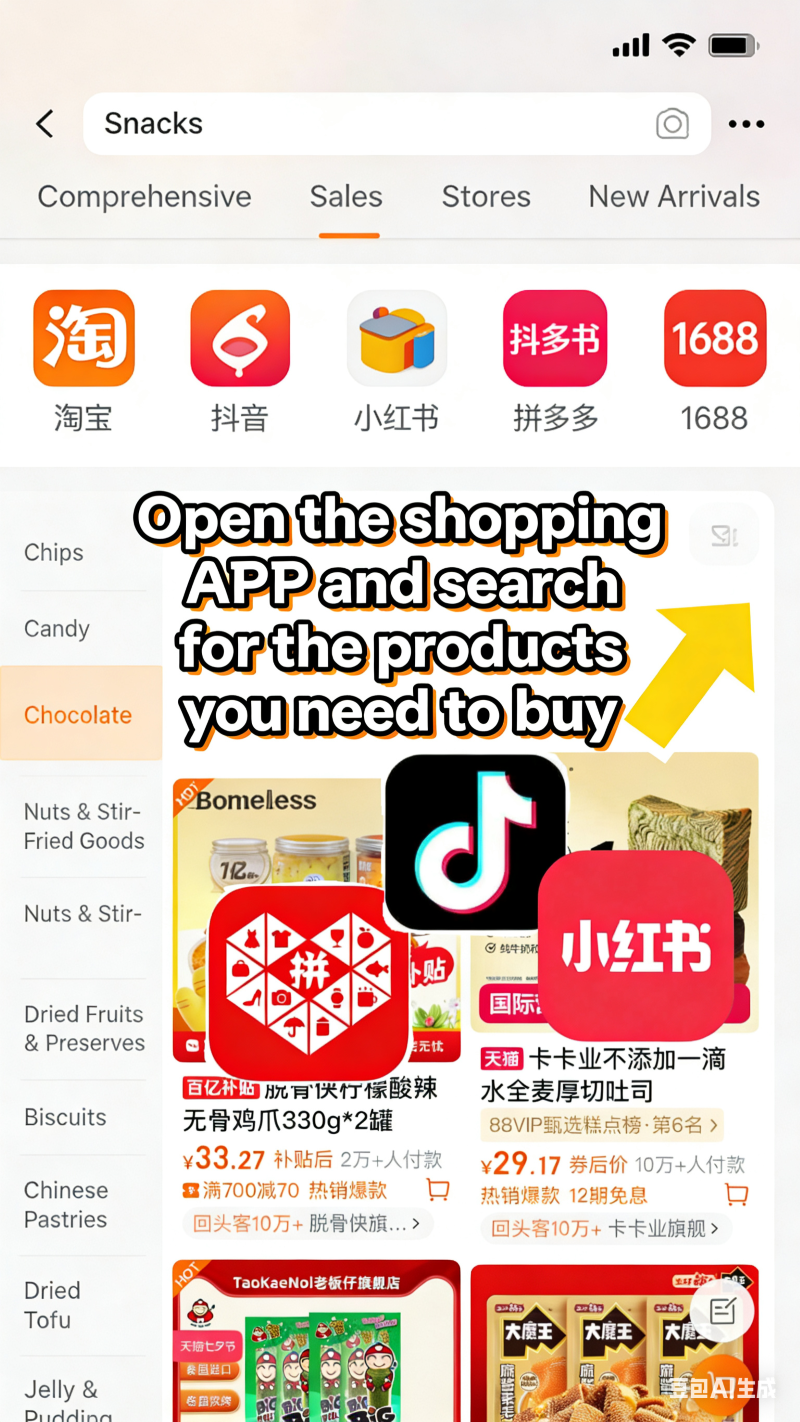
Open the APP where you need to purchase the goods
Step Two
Download and register/log in to the Taojiyun TW app
Open an iPhoneClick to jump to the APP Store downloadSearch for the Taojiyun Taiwan version APP
Android phoneClick here to download and jumpDownload the Taojiyun Taiwan version APP
2. ClickRegister/Log in】
Get an exclusive address for the Chinese mainland

Step Three
Copy the address to the address bar of the shopping APP
Wait for the goods to arrive at the consolidation warehouse and check the box to apply for consolidation

Step Four
Fill in the delivery address in Taiwan
Pay the freight
Waiting for the delivery to your door
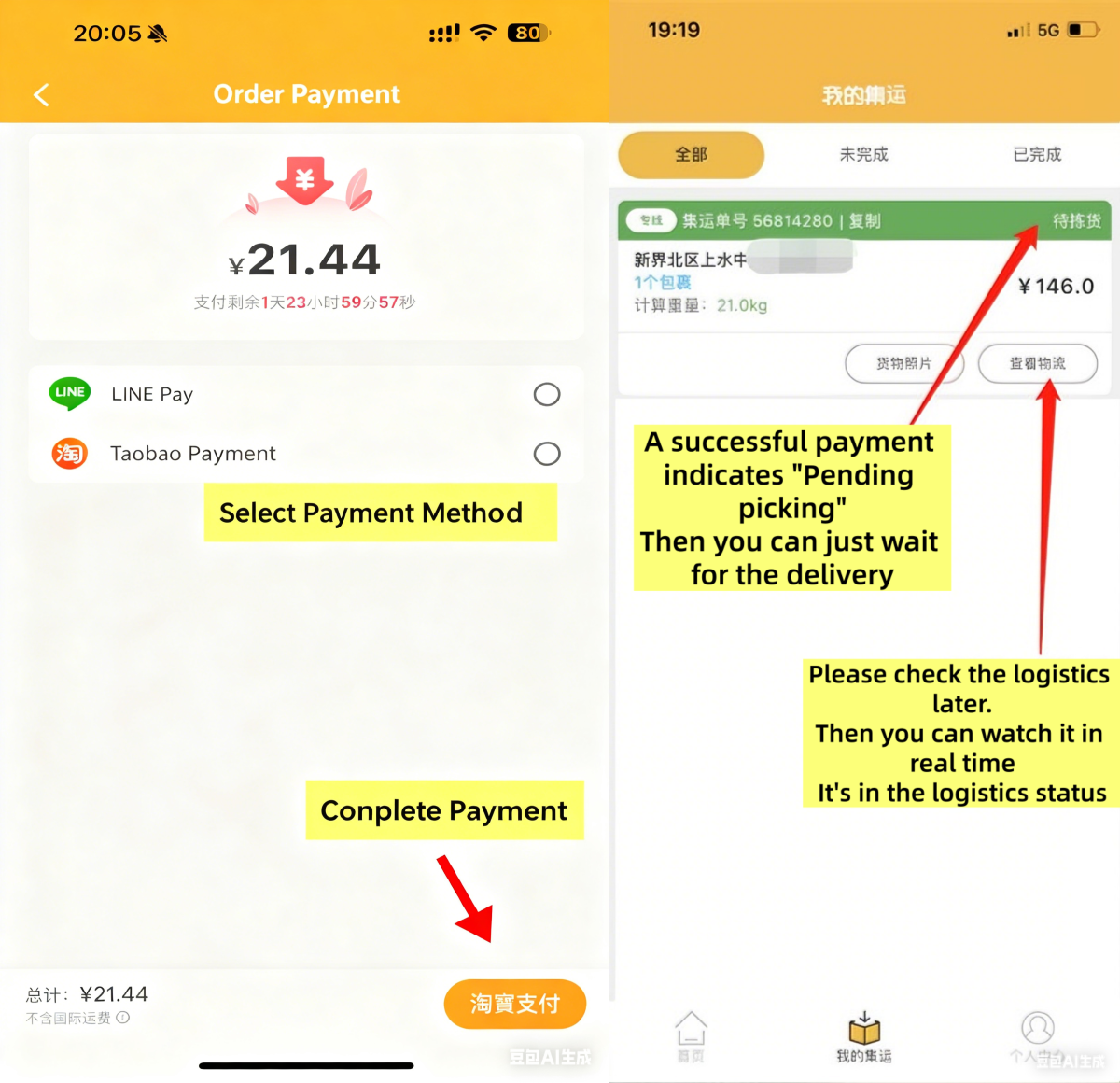
Step Five
Waiting for the goods to be delivered to your door

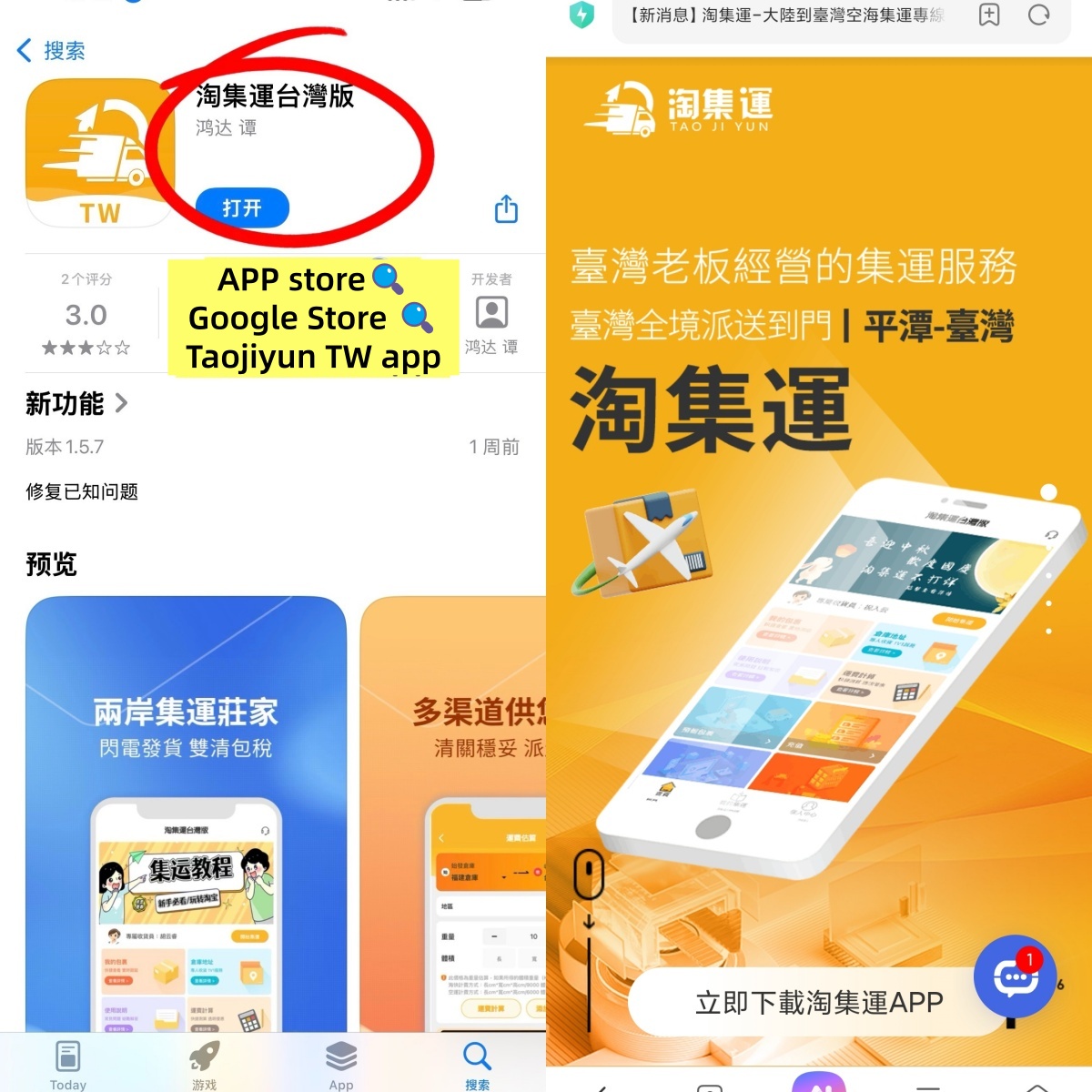
The first step
Open an iPhoneClick to jump to the APP Store downloadSearch for the Taojiyun Taiwan version APP
Android phoneClick here to download and jumpDownload the Taojiyun Taiwan version APP
Step Two
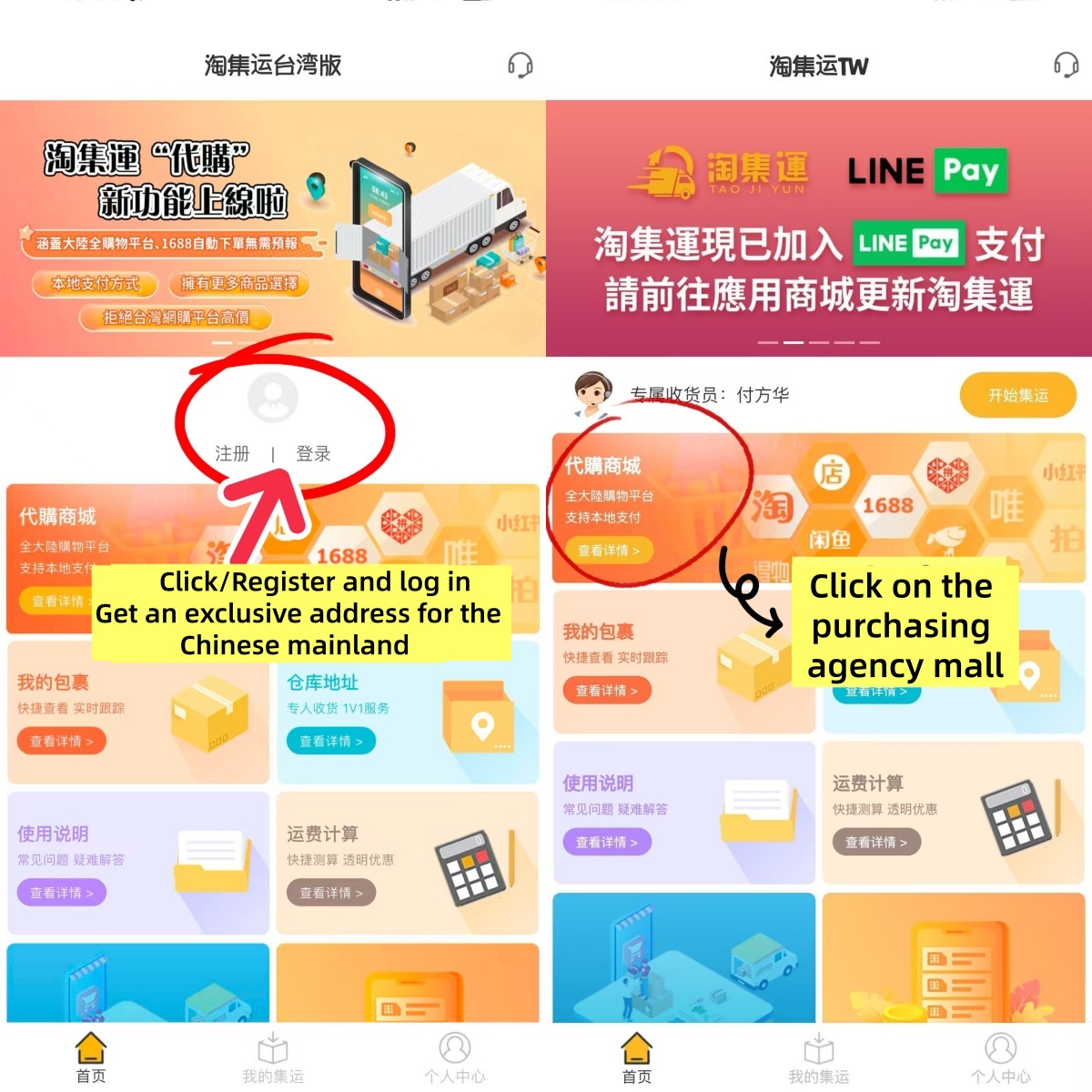
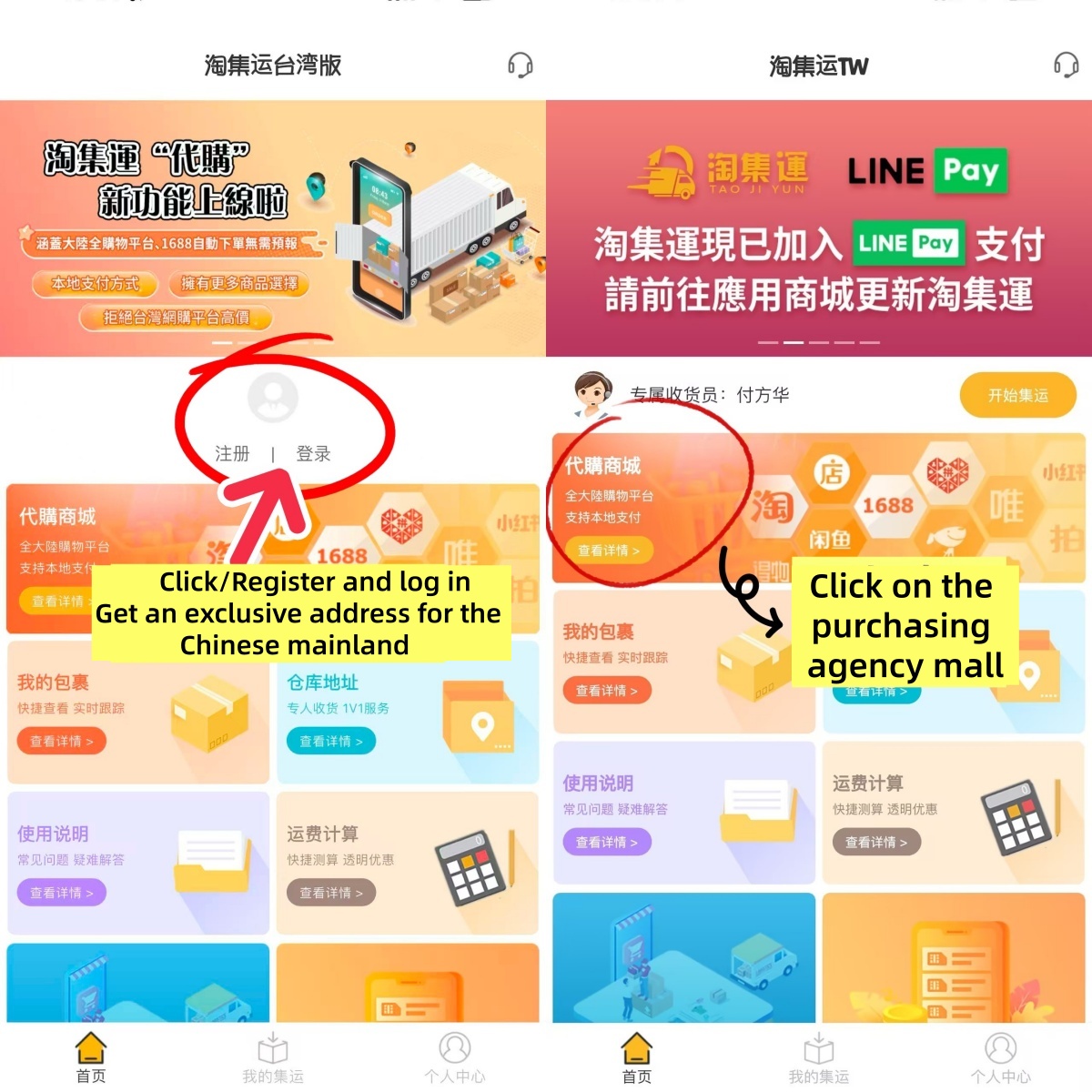
ClickRegister/Log inGet an exclusive address for the Chinese mainland
Click on the purchasing agency Mall on the homepage
Step Three
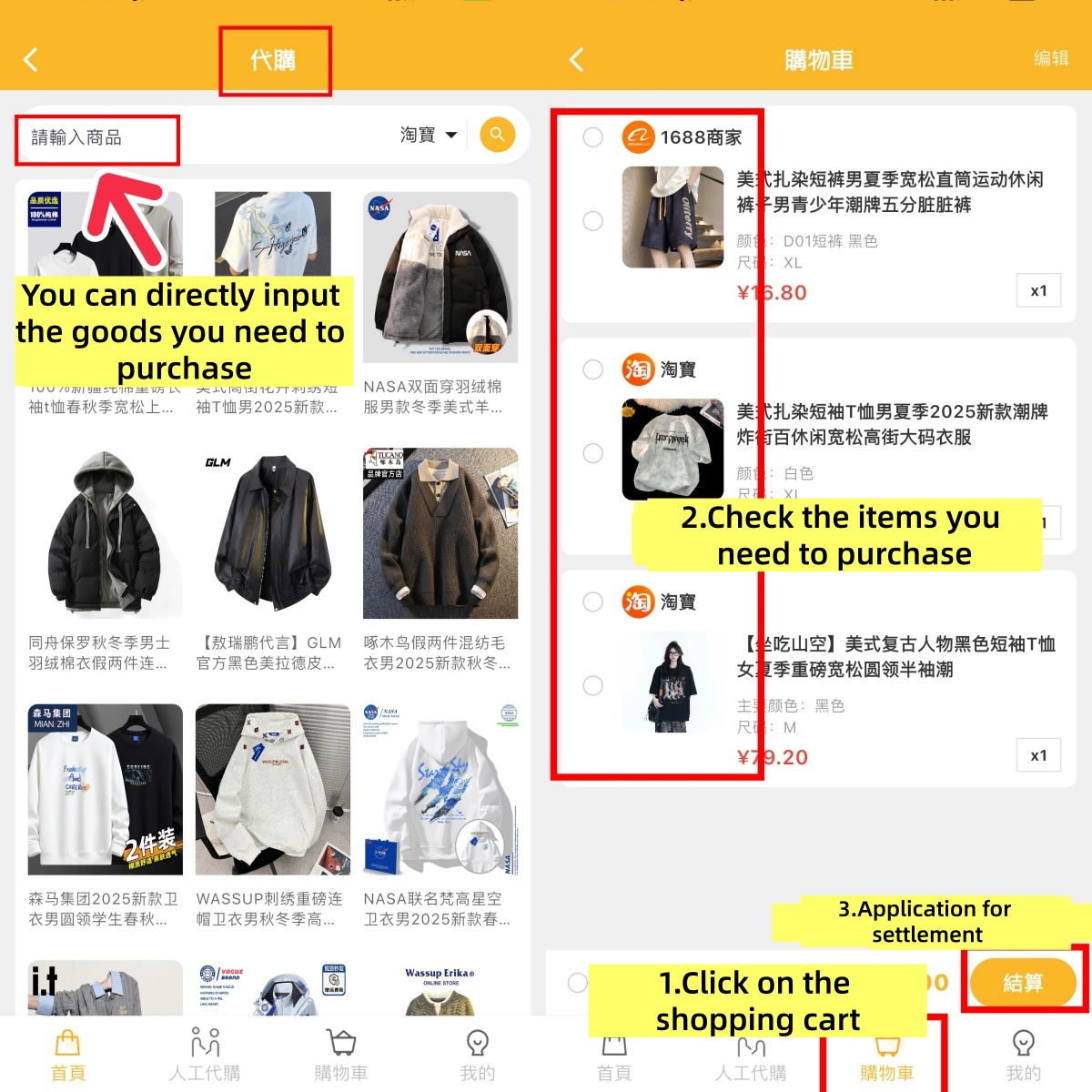
Enter the purchasing agent page and input the name of the product you need to buy
Click on the shopping cart, select the items you need to purchase, and apply for settlement
Step Four
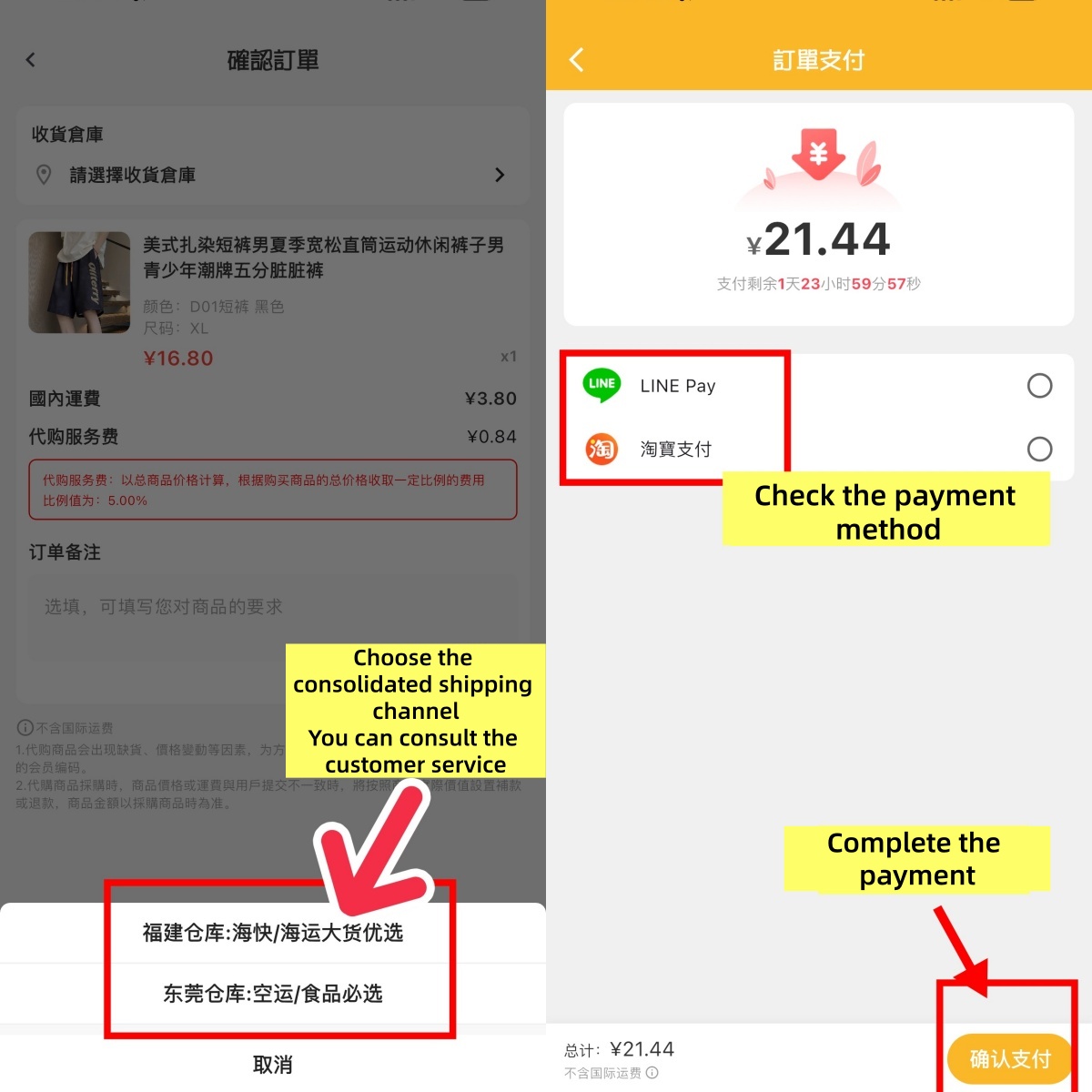
For choosing a consolidated shipping channel, you can consult our customer service.
Select the payment method and complete the order
Step Five
Taoji Shipping
The goods are consolidated and packed, the parcels are reinforced, and they are weighed and dispatched
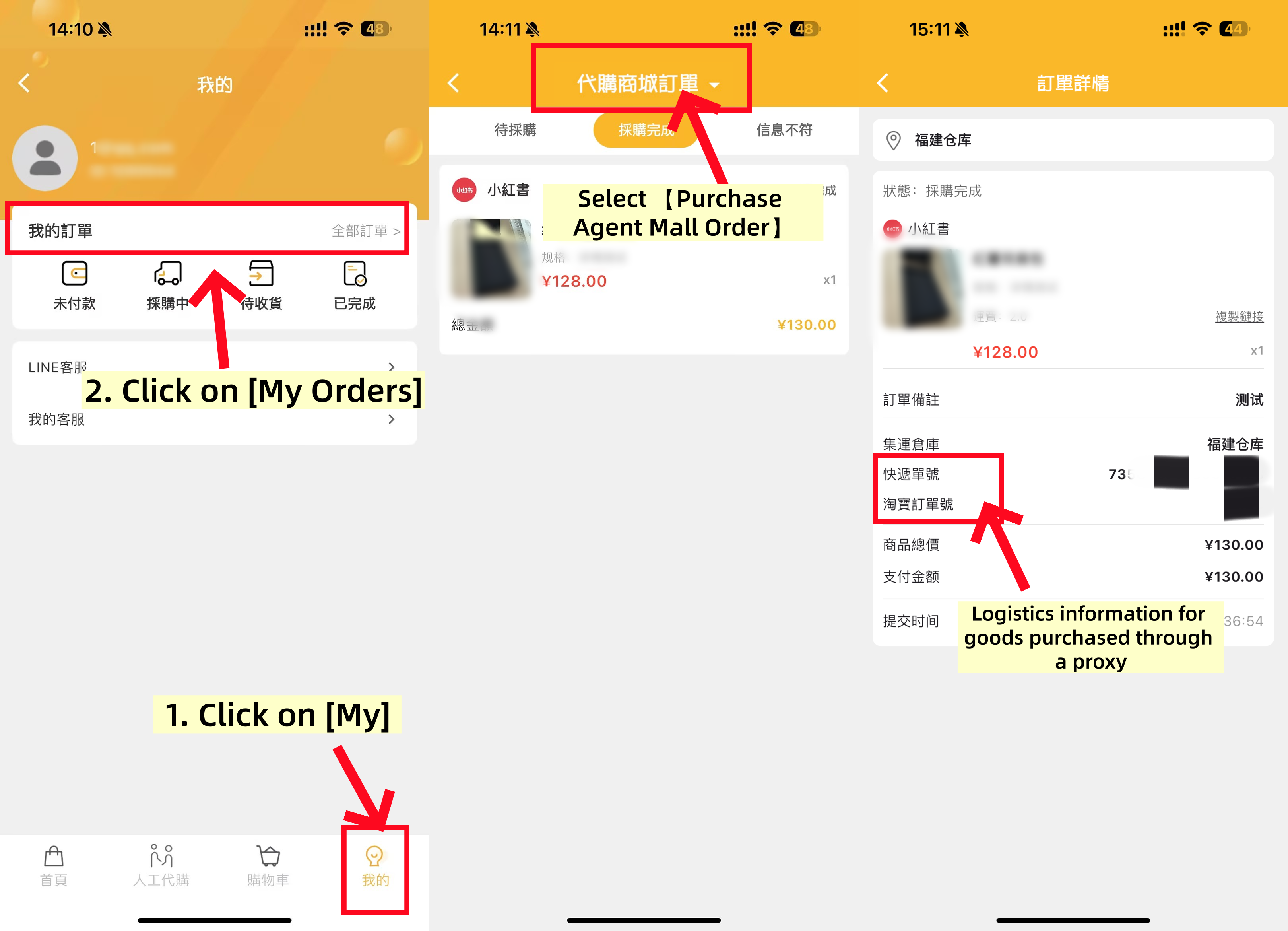
TIPS: After shipment, you can check in ; Taojiyun APP” -“ My Check the logistics information of my order
Step 6
Waiting for the delivery
View the logistics trajectory and keep track of the package delivery progress on the package list page
TIPS:
During the process of international parcel delivery, there is a certain probability of unexpected situations occurring, such as delays, confiscation, taxation, damage, loss, etc. Taojiyun cannot control or avoid the service quality and unexpected situations that may occur with third-party logistics providers and customs of various countries.
However, in line with the service philosophy of putting users first, Taojiyun will inform and remind you in advance based on the conditions of each route and country, and do its best to assist you in case of any problems.
Step 7
Confirm receipt of goods
After receiving the package, at Taojiyun APP” -“ My Check and confirm the signed package in the Completed section
In case of any problems, you can submit an after-sales application on the corresponding package form or contact Taojiyun Taiwan &rarr. 【Human online customer service】

The first step
Open an iPhoneClick to jump to the APP Store downloadSearch for the Taojiyun Taiwan version APP
Android phoneClick here to download and jumpDownload the Taojiyun Taiwan version APP

Step Two
ClickRegister/Log inGet an exclusive address for the Chinese mainland
Click on the purchasing agency Mall on the homepage
Step Three
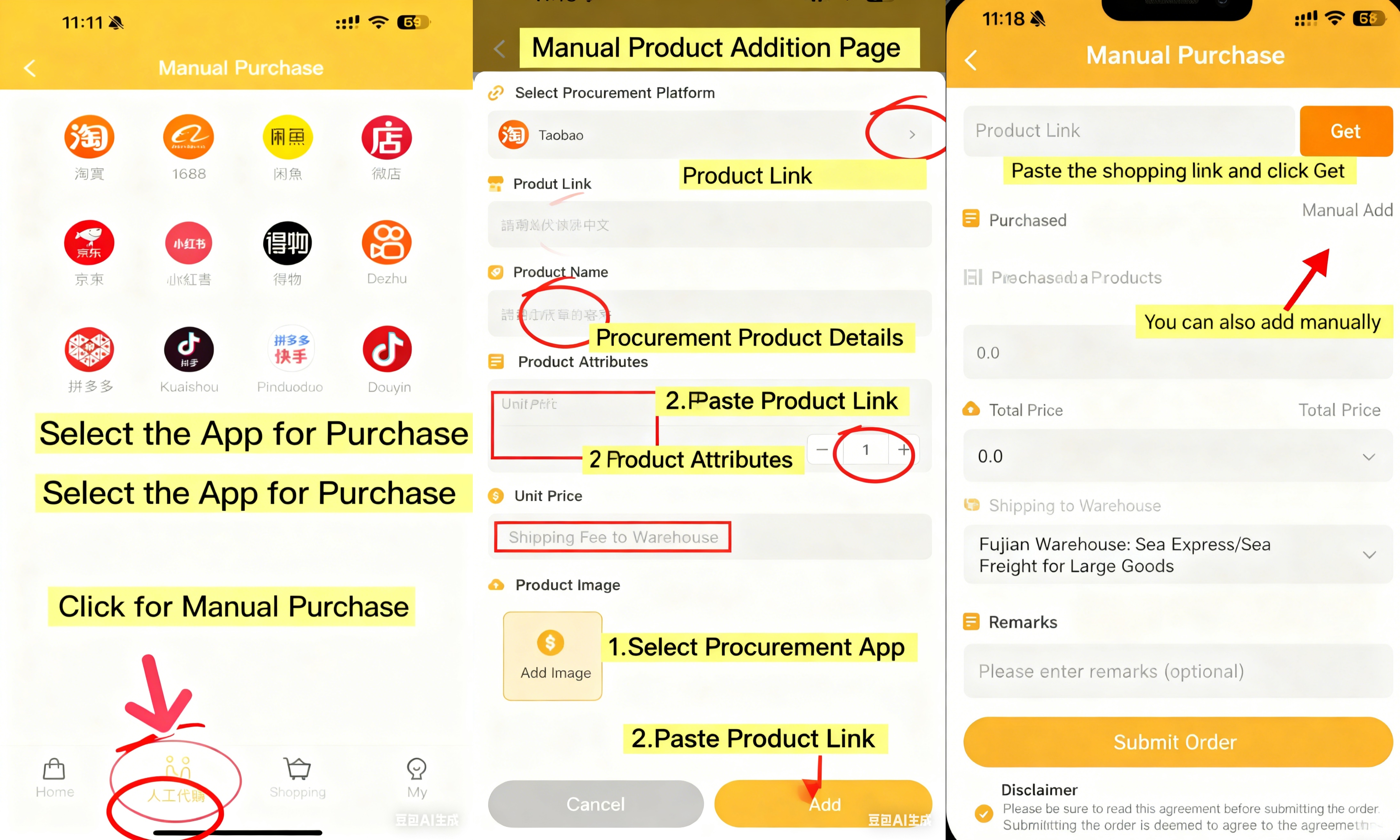
Automatically identify the content of the purchased goods on behalf of others
1. Click on Manual Purchasing Agent/Select the APP for which you need to purchase on your behalf
2. Paste the shopping link - click to get
Manually fill in the content of the purchased goods
1. Click Add Manually, copy the product link and paste it
2. Clearly state the style, color and size of the goods you want to purchase
3. Enter the correct unit price (if you need to order two items, add 1 after the unit price)
4. The shipping fee depends on whether the store link offers free shipping (write 0 for free shipping, and write exactly how much the shipping fee is for free shipping).
5. Upload product pictures and click Submit Order.
Step Four
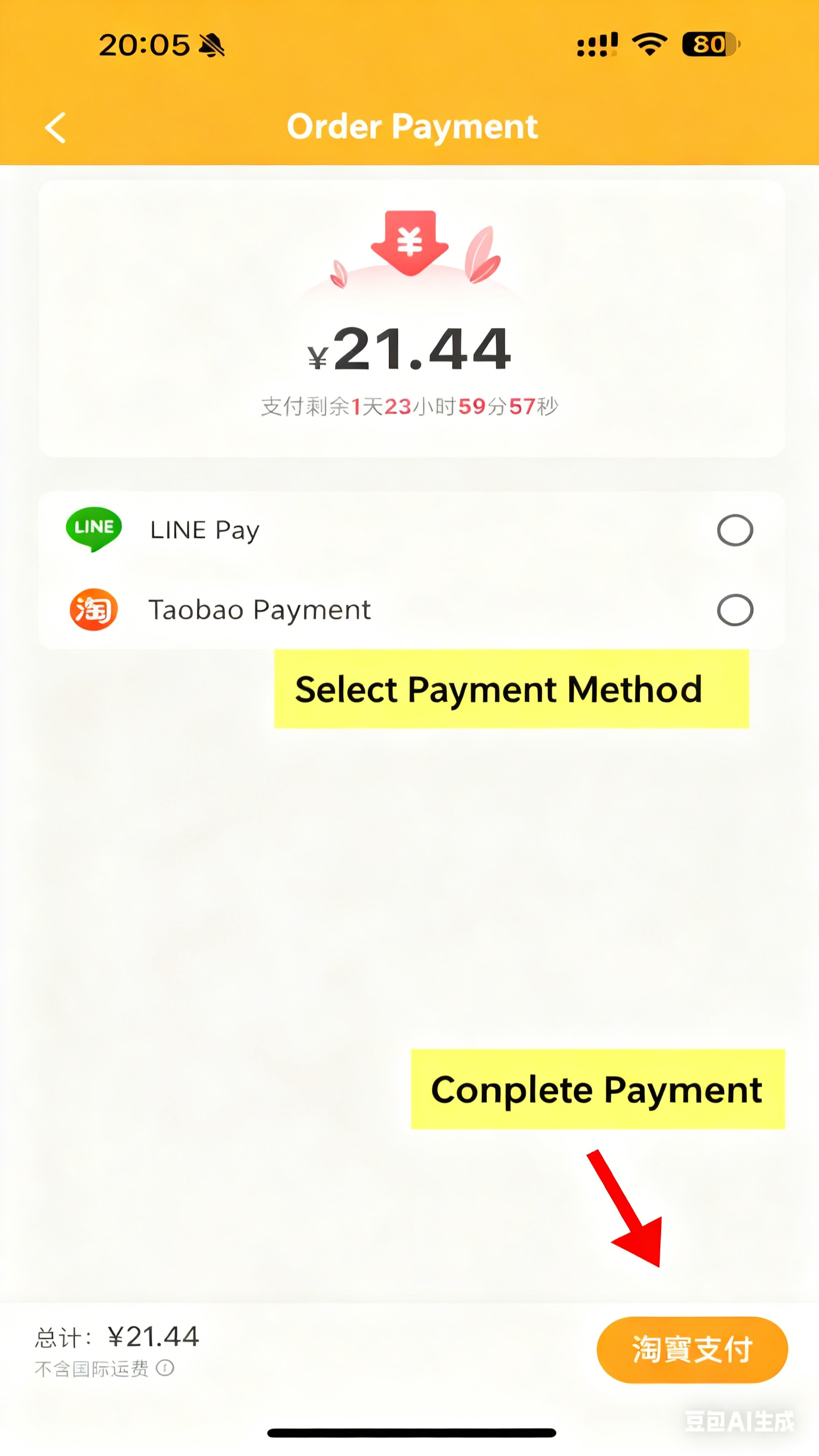
Pay the amount and complete the order
Select the payment method
Complete the order
Step Five
Taoji Shipping
The goods are consolidated and packed, the parcels are reinforced, and they are weighed and dispatched
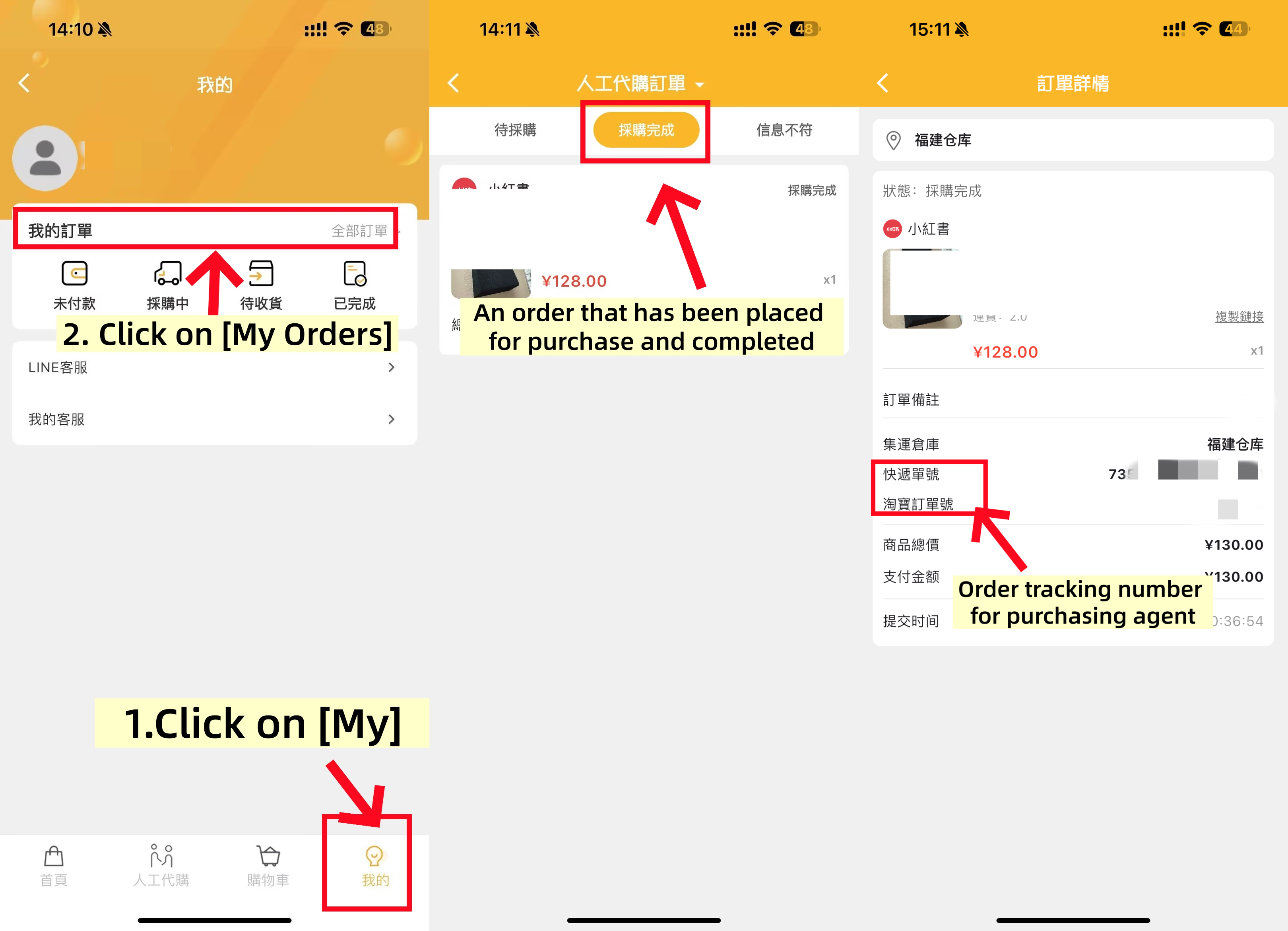
TIPS: After shipment, you can check in ; Taojiyun APP” -“ My Check the logistics information of my order
Step 6
Waiting for the delivery
View the logistics trajectory and keep track of the package delivery progress on the package list page
TIPS:
During the process of international parcel delivery, there is a certain probability of unexpected situations occurring, such as delays, confiscation, taxation, damage, loss, etc. Taojiyun cannot control or avoid the service quality and unexpected situations that may occur with third-party logistics providers and customs of various countries.
However, in line with the service philosophy of putting users first, Taojiyun will inform and remind you in advance based on the conditions of each route and country, and do its best to assist you in case of any problems.
Step 7
Confirm receipt of goods
After receiving the package, at Taojiyun APP” -“ My Check and confirm the signed package in the Completed section
In case of any problems, you can submit an after-sales application on the corresponding package form or contact Taojiyun Taiwan &rarr. 【Human online customer service】
Taojiyun - Taiwan Dedicated Line Contact Information:
WeChat: Taojiyun Taiwan Consolidation 18814360092
Line:@269trfre
Click to jump to Taiwan's online customer service:【Online customer service】

Beijing Time 2024/10/10 16:09:40
Download APP

Download Taojiyun APP
More convenient query
Customer Service

Scan the QR code to add WeChat
13049844111

Scan the QR code to add WhatsApp
54271072
Line

Scan the QR code to add Line
@269trfre