 Email:vip@taojiyun.com
- ID:17154831823
- VIP:淘集运会员
- User Center Log Out
- My Shopping Cart My Order
-
~ Empty ~
-
~ Empty ~
Email:vip@taojiyun.com
Taojiyun 2025-12-24 14:40:15 630k 0 0 Logistics Information
Nowadays, Xiaohongshu (Little Red Book) is no longer just a "product discovery platform"; it has evolved into a comprehensive platform integrating shopping, sharing, and social interaction. However, many new users often encounter problems when they first start shopping on Xiaohongshu, such as "not knowing how to screen genuine products", "chaotic logistics after placing an order", "wanting to buy overseas products but not knowing how to arrange shipping forwarding", and "fearing being scammed when finding a purchasing agent".
This ultimate guide covers all the essential shipping consolidation and purchasing agent tips. Whether you are a student, a complete beginner, or an overseas user, you can easily master these skills and shop with confidence on Xiaohongshu!
1. Preparations
First, ensure that your Xiaohongshu account has completed real-name authentication (Path: Me - Settings - Account and Security - Real-Name Authentication). Real-name authentication not only improves the security level of your shopping but also entitles you to comprehensive after-sales protection. At the same time, it is recommended to enable the "Payment Security Reminder" (same path as above). Once enabled, you will receive SMS notifications for payment, refund, and other operations to prevent account theft.
Pro Tip: When completing your personal profile, you can follow the corresponding official flagship stores and brand official accounts based on your frequently purchased categories, so you can get the latest product information and exclusive coupons in a timely manner.
2. Product Discovery & Screening
The core of shopping on Xiaohongshu is "discovering products first, then placing orders". But how to screen reliable content from a large number of notes? Remember these 3 points:
- Check the authenticity of notes: Prioritize notes with labels such as "Genuine Experience" and "Actual Test". Avoid content with templated copy and over-edited images; focus on the comment section and pay attention to "whether there are real product photos", "whether the usage feedback is specific".
- Check store qualifications: Before placing an order, be sure to click the product link to enter the store and check for "Brand Certification" and "Official Flagship Store" logos. Also, check the store ratings (Product Description Accuracy, Service Attitude, Logistics Speed). Stores with all three ratings above 4.8 are more reliable.
3. Order Placement & Payment
After screening the right products, follow these 2 tips during the order placement process to save money and avoid pitfalls:
- Claim hidden coupons: In addition to the coupons displayed on the product page, you can click the store homepage to check for "New User Coupons" and "Threshold Discount Coupons". For some categories, you can also claim platform subsidy coupons in the "My - Coupon Center" on Xiaohongshu, which are more cost-effective when used in combination.
- Choose a secure payment method: Prioritize using Xiaohongshu's platform payment (supports WeChat Pay and Alipay) and avoid transferring money directly to the seller. When making a payment, confirm the order information, including product model, quantity, and shipping address.
The first step
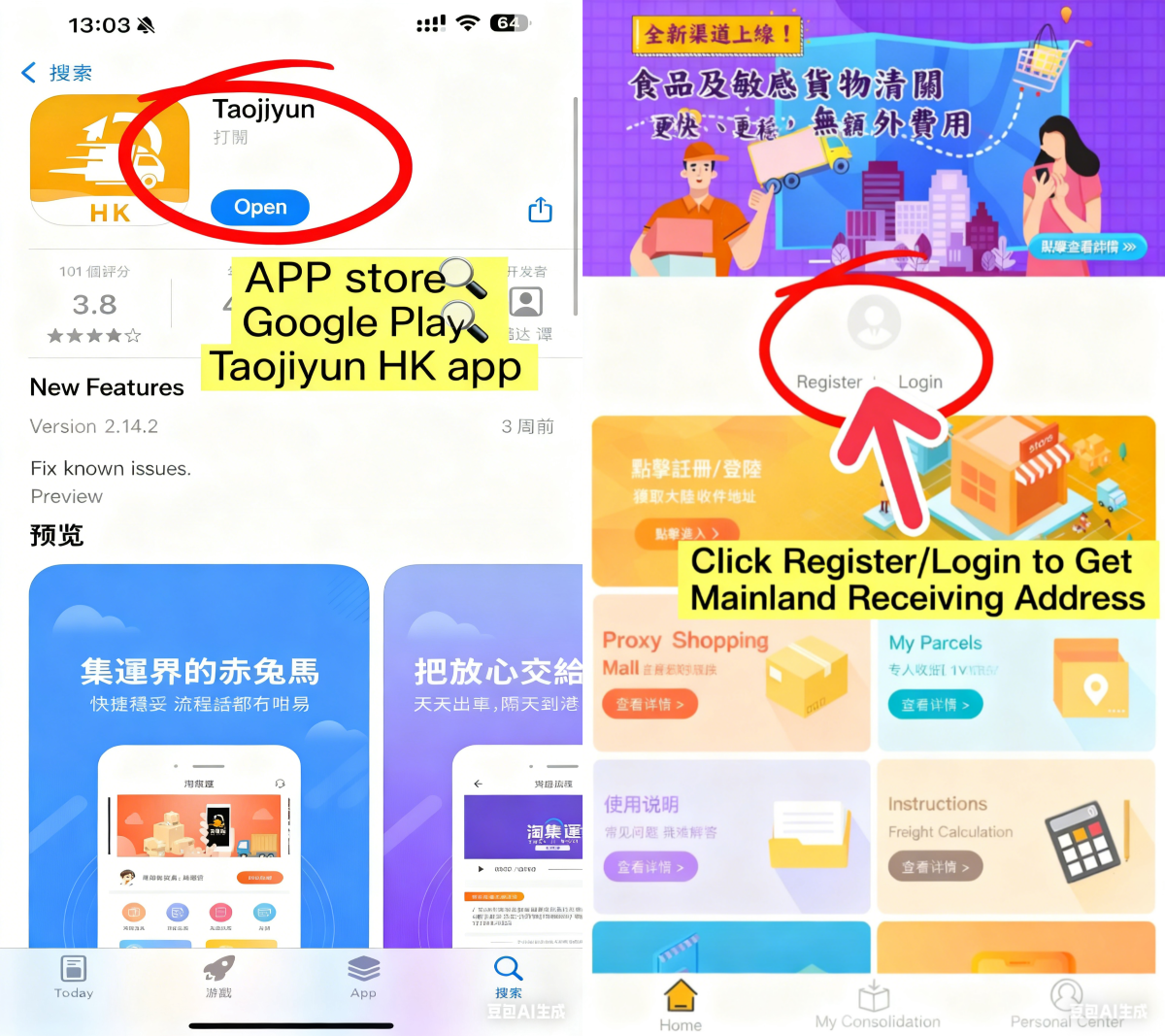
Download/Register and log in to the Taojiyun HK APP
Click to register now. > >Register
Step Two
Get the exclusive delivery address for the Chinese mainlandCopy the address into the address bar of the shopping APP
Step Three
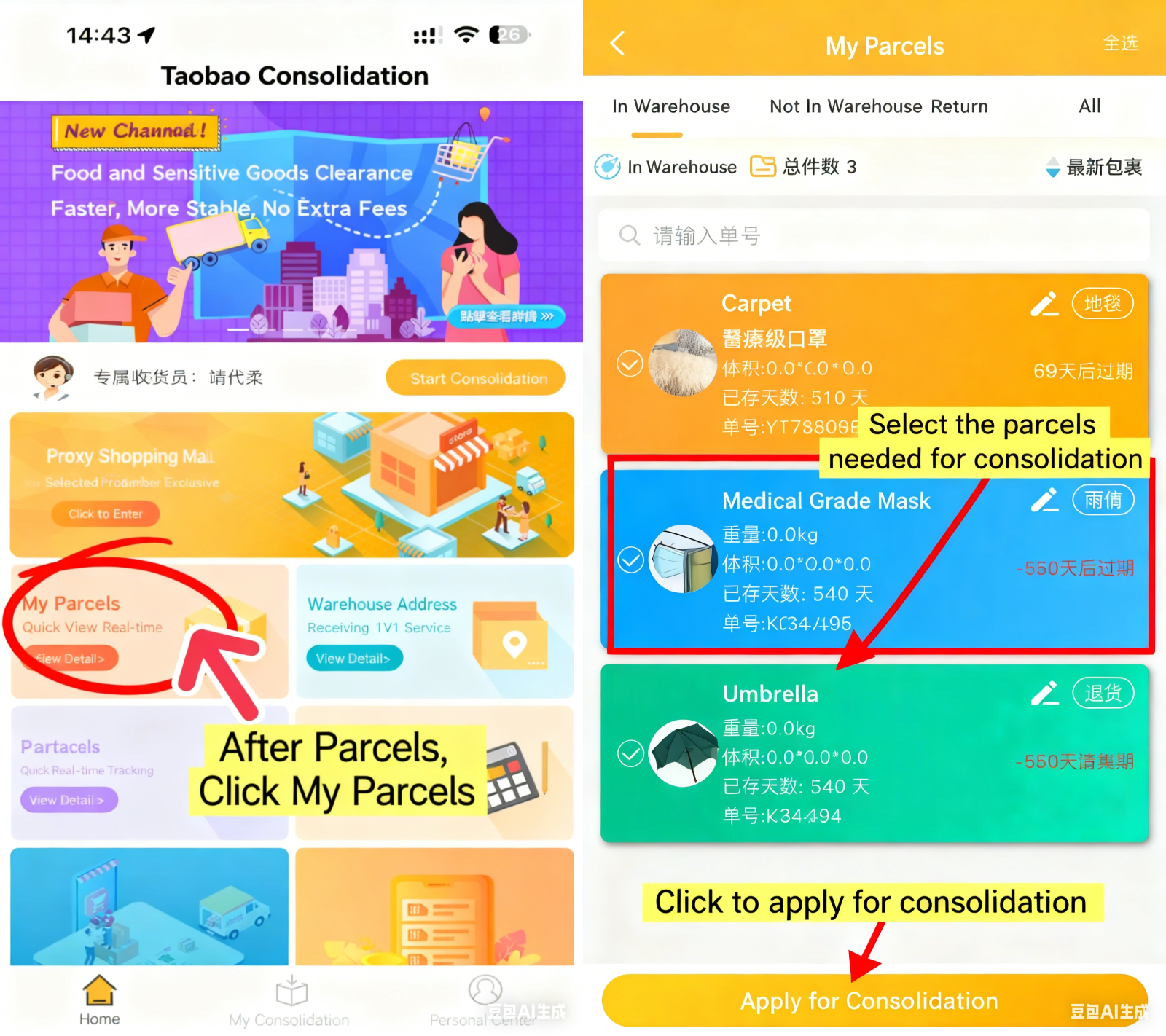
Wait for the goods to arrive at the consolidation warehouseSelect the packages that need consolidated shipping and apply for consolidated shipping
Step Four
If the corresponding package is not seen, it is in ; Not warehoused; In thePackages can also be added manually
Step Five
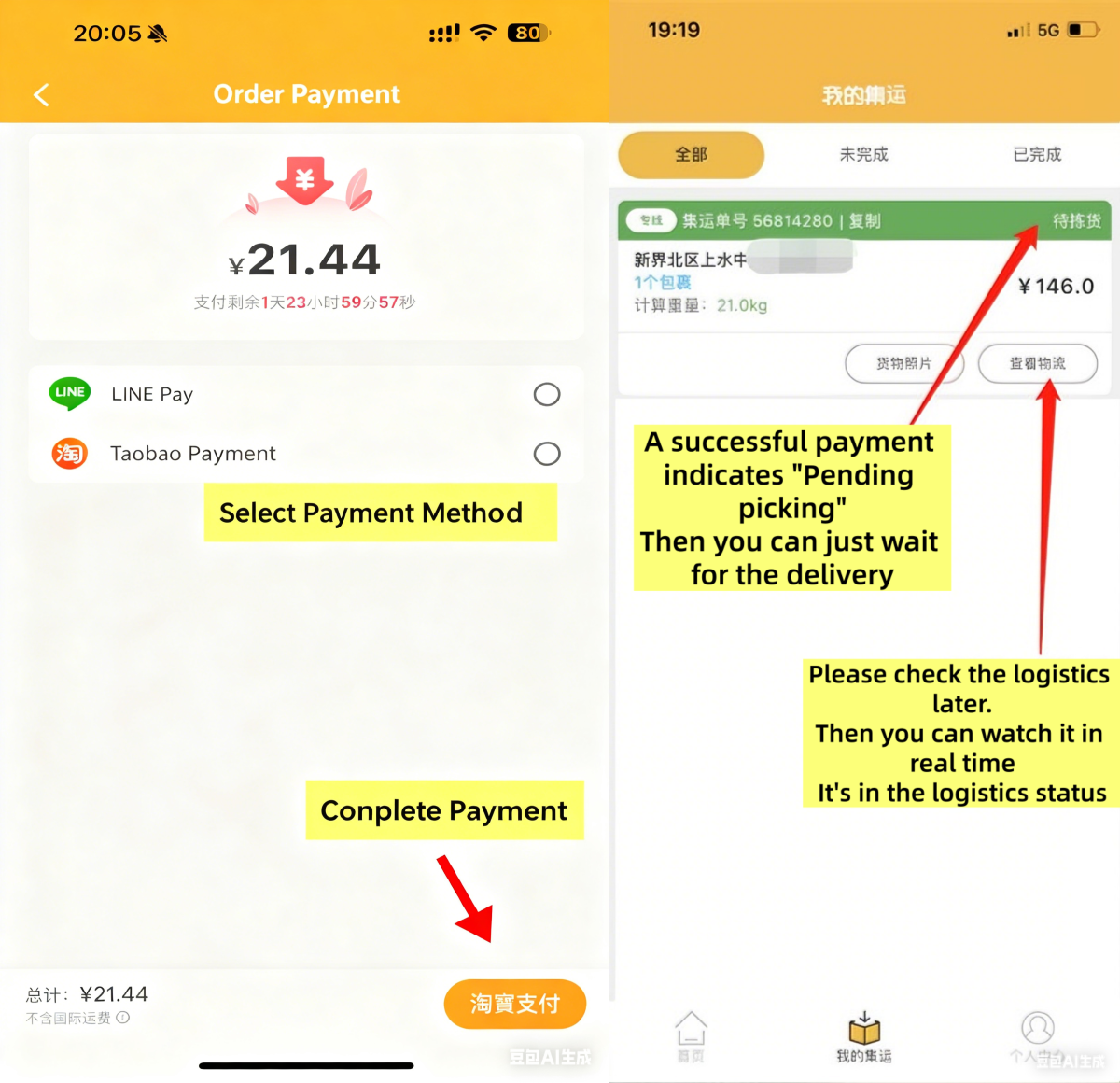
Pay the consolidated shipping freight
View logistics information
Step 6
Waiting for the goods to be delivered to your door
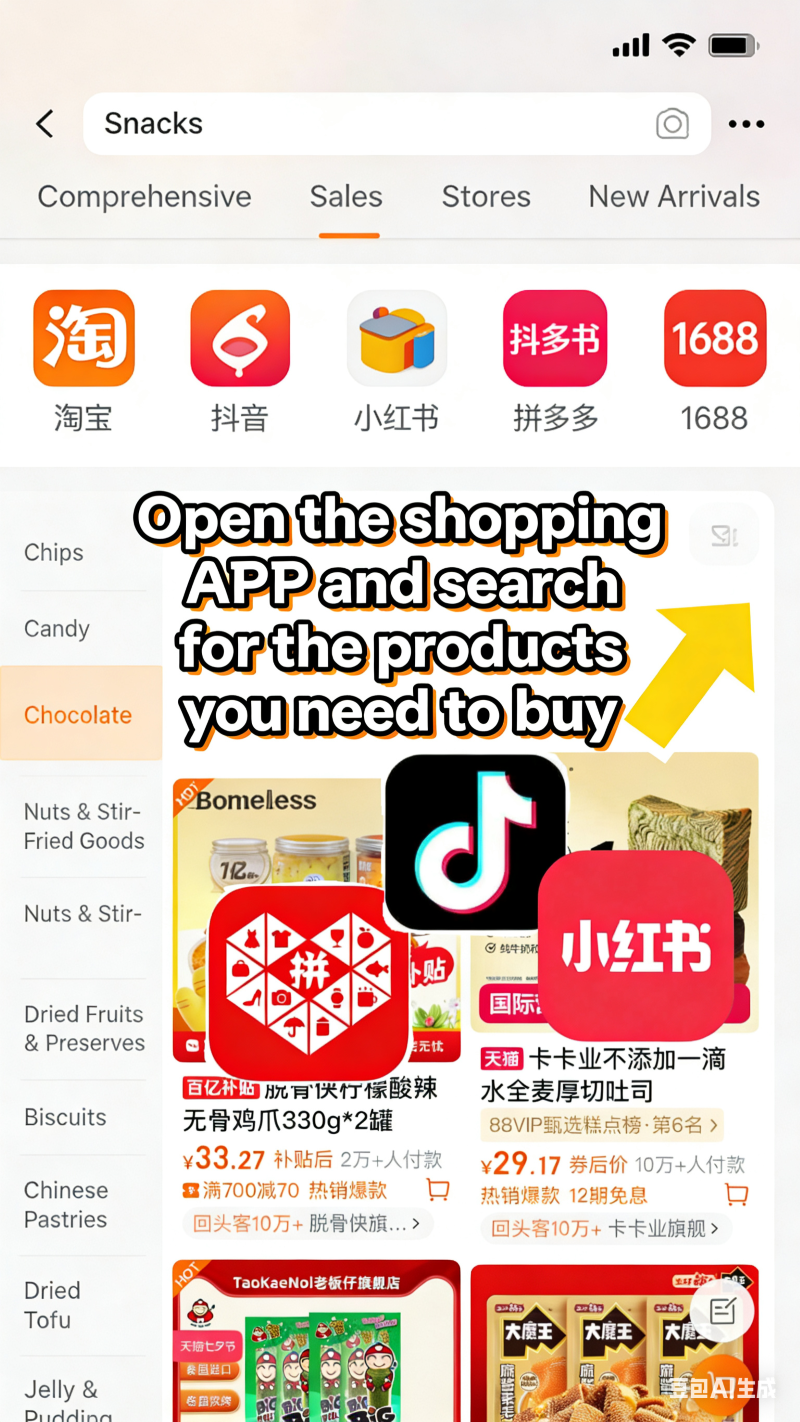
Open the APP of the product you want to buy
Step 2
1.Download, register/login to TaoJiYun TW app
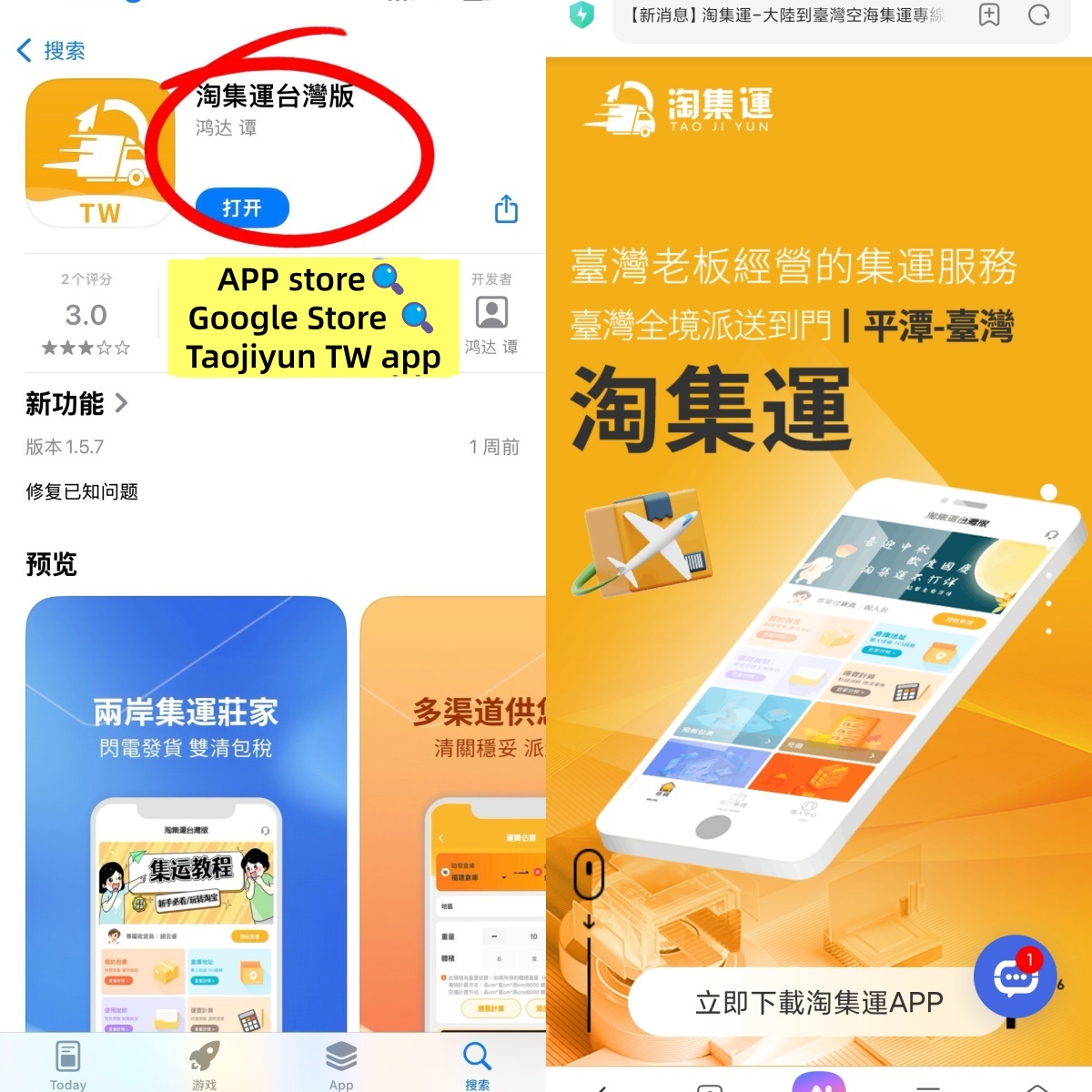
For iPhone users: Open【Click to redirect to APP Store download】and search for TaoJiYun Taiwan Version APP
For Android users:【Click here to redirect for download】to download TaoJiYun Taiwan Version APP
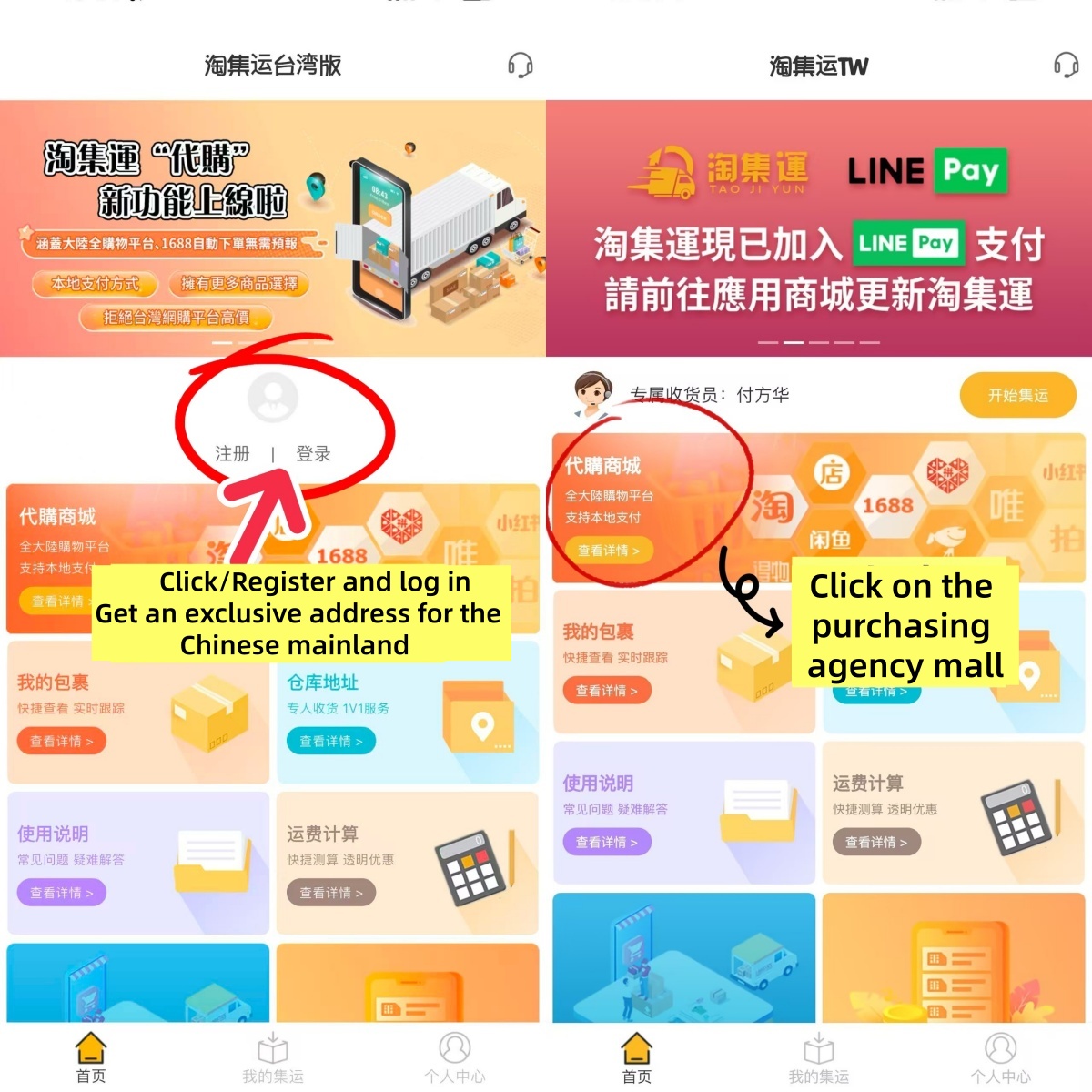
2.Click【Register/Login】
Obtain exclusive mainland address
Step 3
Copy the address to the address bar of the shopping APP
Wait for the goods to arrive at the consolidated shipping warehouse, check and apply for consolidated shipping
Step 4
Fill in Taiwan receiving address
Pay shipping fee
Wait for home delivery
Step 5
Wait for the goods to be delivered to your door
step1
Open an iPhoneClick to jump to the APP Store downloadSearch for the Taojiyun Taiwan version APP
Android phoneClick here to download and jumpDownload the Taojiyun Taiwan version APP
Step2
ClickRegister/Log inGet an exclusive address for the Chinese mainland
Click on the purchasing agency Mall on the homepage
If you need a human agent to purchase on your behalf-Click to jump to the tutorial】
Step3
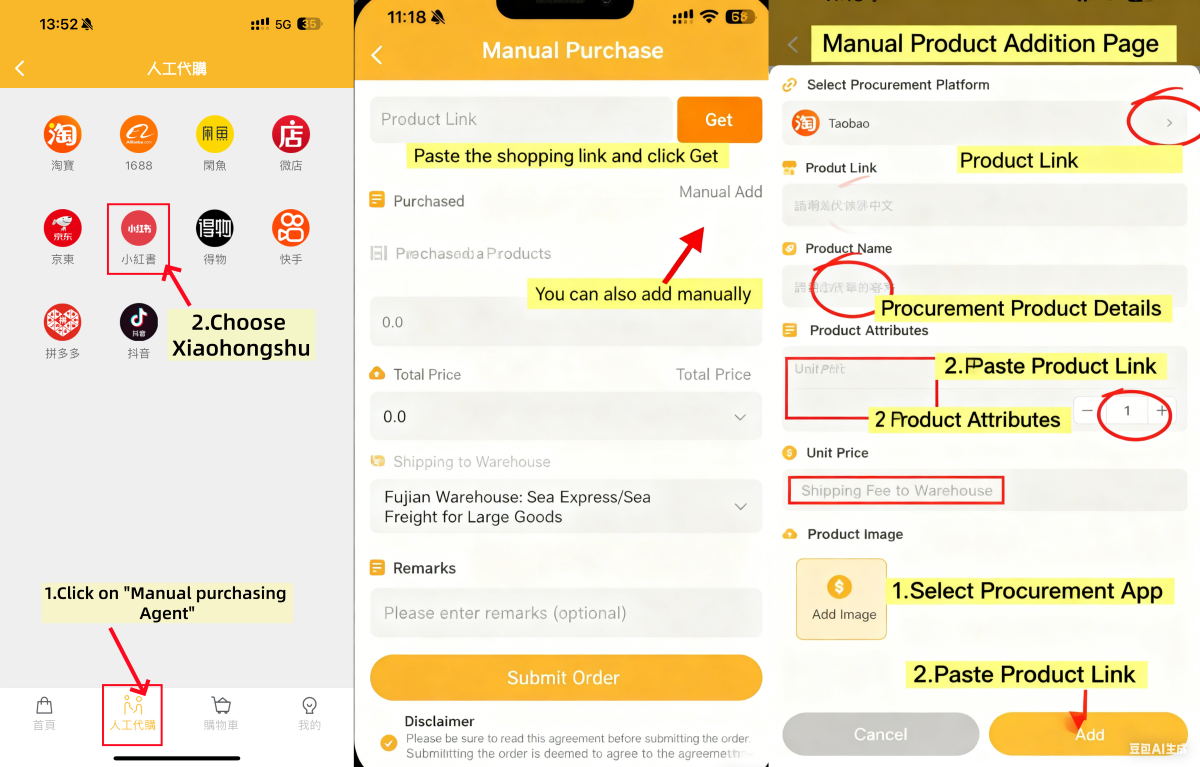
Click on Manual Purchasing Agent - select the Xiaohongshu app
1. Click Add Manually, copy the product link and paste it
2. Clearly state the style, color and size of the goods you want to purchase
3. Enter the correct unit price (if you need to order two items, add 1 after the unit price)
4. The shipping fee depends on whether the store link offers free shipping (write 0 for free shipping, and write exactly how much the shipping fee is for free shipping).
5. Upload product pictures and click Submit Order.
Step 4
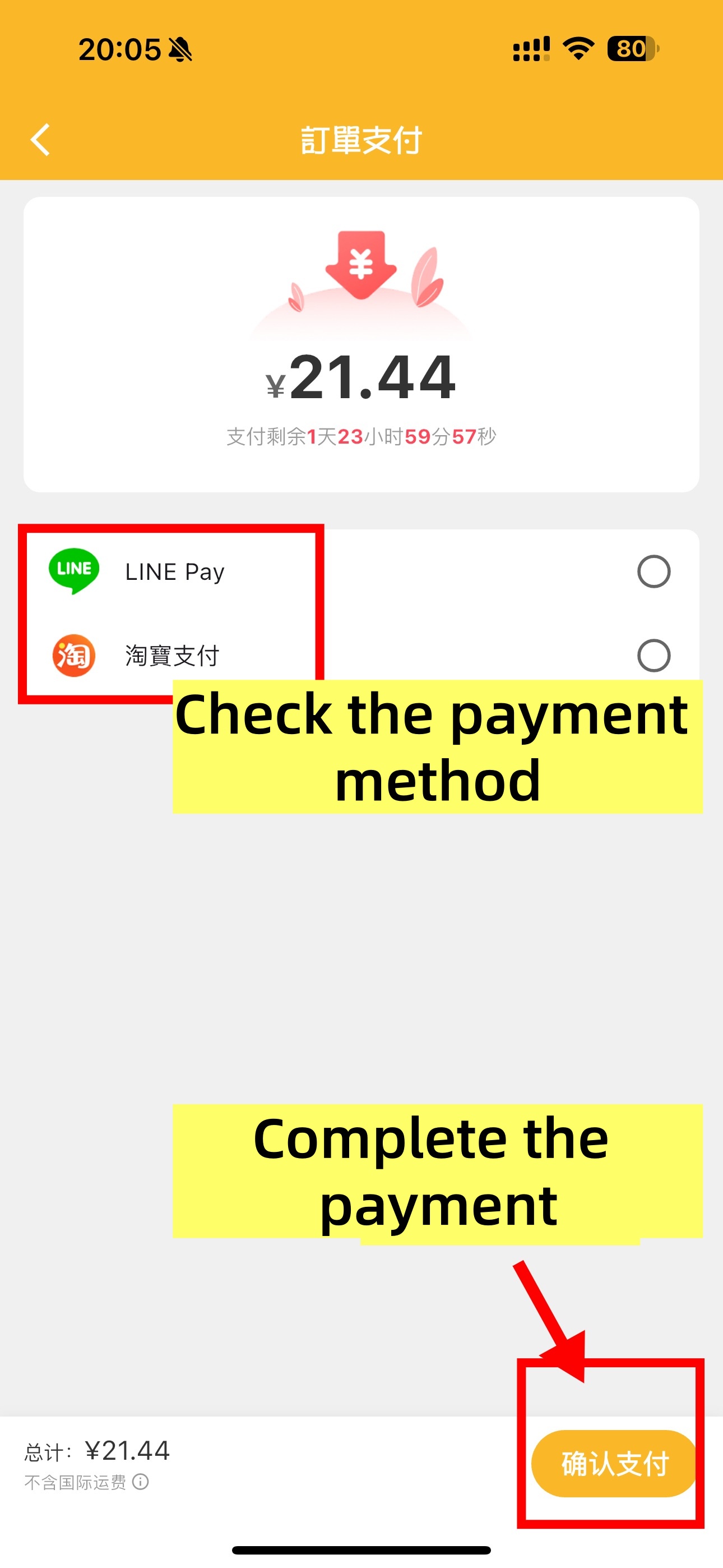
Pay the amount and complete the order
Step 5
Taoji Shipping
The goods are consolidated and packed, the parcels are reinforced, and they are weighed and dispatched
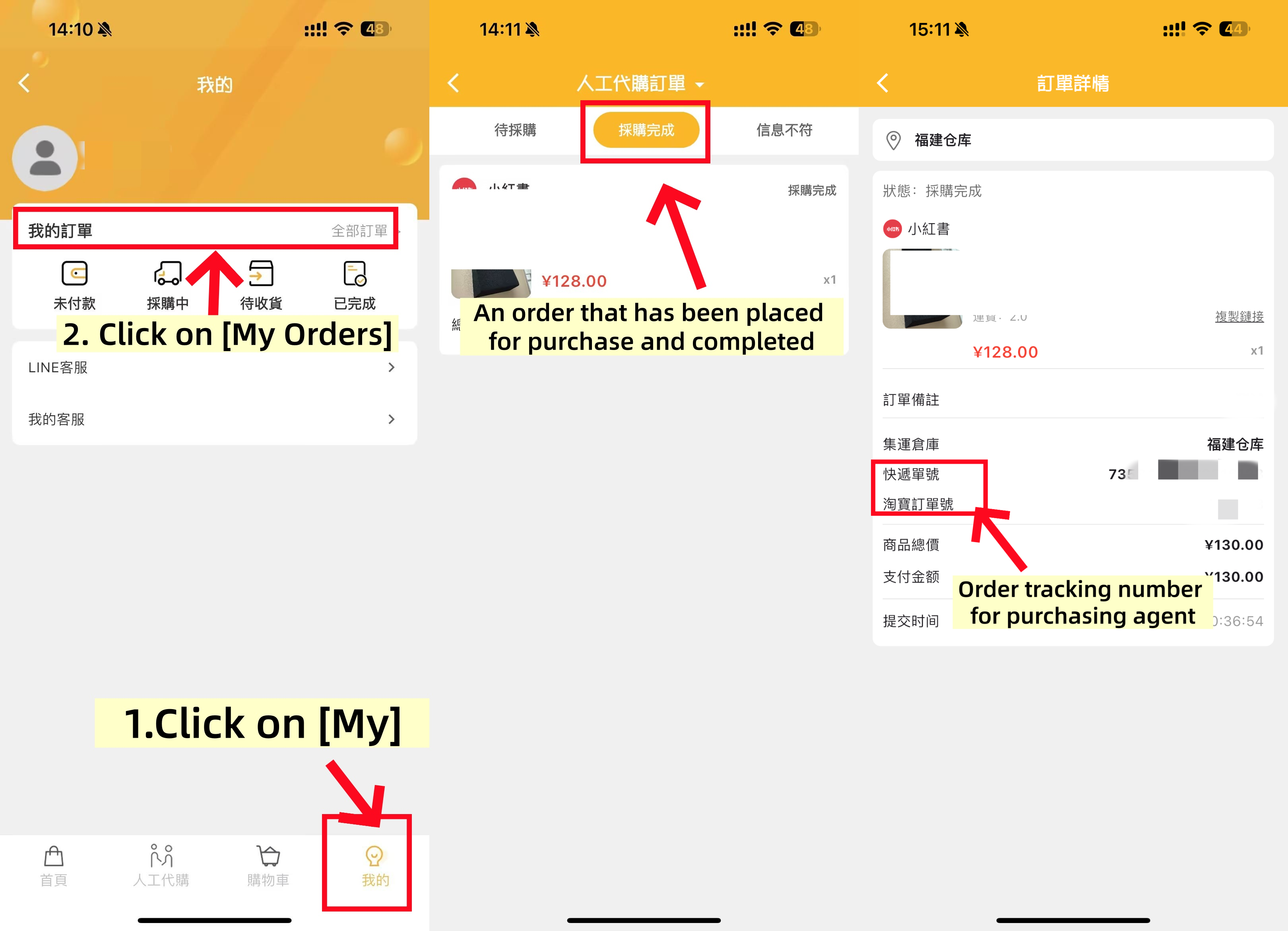
TIPS: After shipment, you can check in ; Taojiyun APP” -“ My purchasing agent View logistics information
Step 6
Wait for the delivery
View the logistics trajectory and keep track of the package delivery progress on the package list page
TIPS:
During the process of international parcel delivery, there is a certain probability of unexpected situations occurring, such as delays, confiscation, taxation, damage, loss, etc. Taojiyun cannot control or avoid the service quality and unexpected situations that may occur with third-party logistics providers and customs of various countries. However, based on the service philosophy of putting users first, Taojiyun will inform and remind in advance according to the situation of each route and country And I will do my best to assist you when problems occur.
Step 7
Confirm receipt of goods
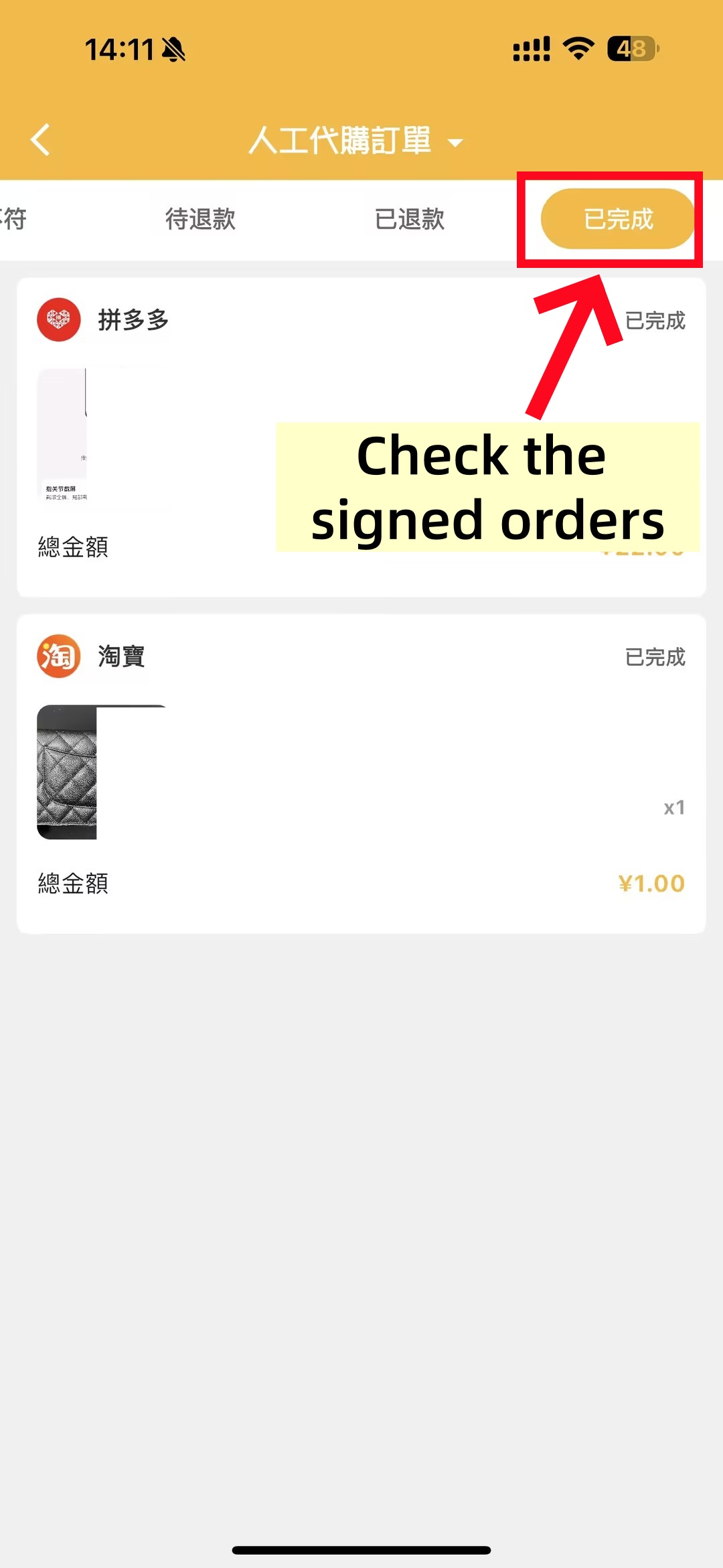
After receiving the package, at Taojiyun APP” -“ My purchasing agent Confirm and sign for receipt inside. In case of any problems, you can submit an after-sales application on the corresponding package form or contact Taojiyun Taiwan &rarr →【Human online customer service】。
Allow Sufficient Time: International shopping involves multiple links and takes a long time for transportation. It may be delayed when encountering holidays or customs inspections, so please wait patiently.
Shop Rationally: Xiaohongshu has a strong product discovery influence, but please stay rational and buy on demand to avoid impulsive consumption.
Pay Attention to Promotions: Xiaohongshu often has various promotional activities. Following the platform and brand accounts allows you to get great deals!
Protect Personal Information: When using shipping consolidation or purchasing agent services, pay attention to protecting your personal privacy and payment information.
WeChat: Taoji Yun Xiao Lin 13049844111WhatsApp: 54271072Click to redirect to online customer service: [ Online Customer Service ]
WeChat: Taoji Yun Taiwan Consolidation Shipping 18814360092Line:@269trfreClick to redirect to Taiwan online customer service: [ Online Customer Service ]

Beijing Time 2024/10/10 16:09:40
Download APP

Download Taojiyun APP
More convenient query
Customer Service

Scan the QR code to add WeChat
13049844111

Scan the QR code to add WhatsApp
54271072
Line

Scan the QR code to add Line
@269trfre