 Email:vip@taojiyun.com
- ID:17154831823
- VIP:淘集运会员
- User Center Log Out
- My Shopping Cart My Order
-
~ Empty ~
-
~ Empty ~
Email:vip@taojiyun.com
Taojiyun 2026-11-27 14:14:18 12k 0 0 Logistics Information
Can't find products on Taobao or 1688 in Taiwan? Here's what to doFrequently Asked Questions
Opening Taobao or 1688 in Taiwan and getting no results, or a regional restriction notice?
Here we break down the causes and solutions, covering network checks and browsing methods, plusTaojiyun Taiwan purchasing-agent and consolidation guides to help sellers, guesthouses and entrepreneurs source goods from mainland China.
Taobao and 1688 are mainland China domestic marketplaces. They filter products by the visitor's IP location, and some items are hidden from overseas IPs by default, so no search results appear at all.
Many 1688 wholesalers and Taobao shops have configured their back office not to ship overseas or to Taiwan, so their products are blocked for Taiwanese users.
If you use the Taiwan version of the app, or your account region is set differently, the platform only shows the product pool for that region, and wholesale items exclusive to mainland China are not displayed.
Enabled cookies or location services, or the platform's security risk controls, can cause search failures and incomplete page loading.
If you can't find a product, run these simple, safe basic checks first:
Clear your browser cache and cookies, then search again in an incognito window;
Check your app version, or switch to the desktop web version to test;
Ask the seller directly whether they accept Taiwan orders or have regional sales restrictions;
You can also browse the Taobao Taiwan site for comparison. Some public listings display normally, but wholesale and exclusive supply items will still be missing.
Important:
Please comply with your local network regulations and choose stable, trustworthy tools carefully. Free tools of unknown origin are not recommended, as they can expose your account and payment details.
Reference steps:
Choose a network tool that is stable, well-reviewed and offers mainland China nodes;
Turn the service on and confirm the node location is mainland China;
Open an incognito page and search for products on the Taobao or 1688 website again;
When you have finished searching, turn the node off and restore your normal network if you no longer need it.
Best for users who have already found their products and can place orders on Taobao or 1688 themselves:
Register and log in to Taojiyun to get your dedicated mainland warehouse address;
Place your order on Taobao or 1688, entering the assigned consolidation warehouse as the delivery address;
The seller ships to the warehouse, and the platform updates the inbound record once the parcel is checked in;
When all goods have arrived, select the parcels and apply for consolidation and packing; large items can be reinforced with a wooden crate;
Choose an air, sea-express or sea freight channel and pay the shipping and related service fees;
After customs clearance the goods are delivered to your Taiwan address, with online tracking throughout.
Step 1
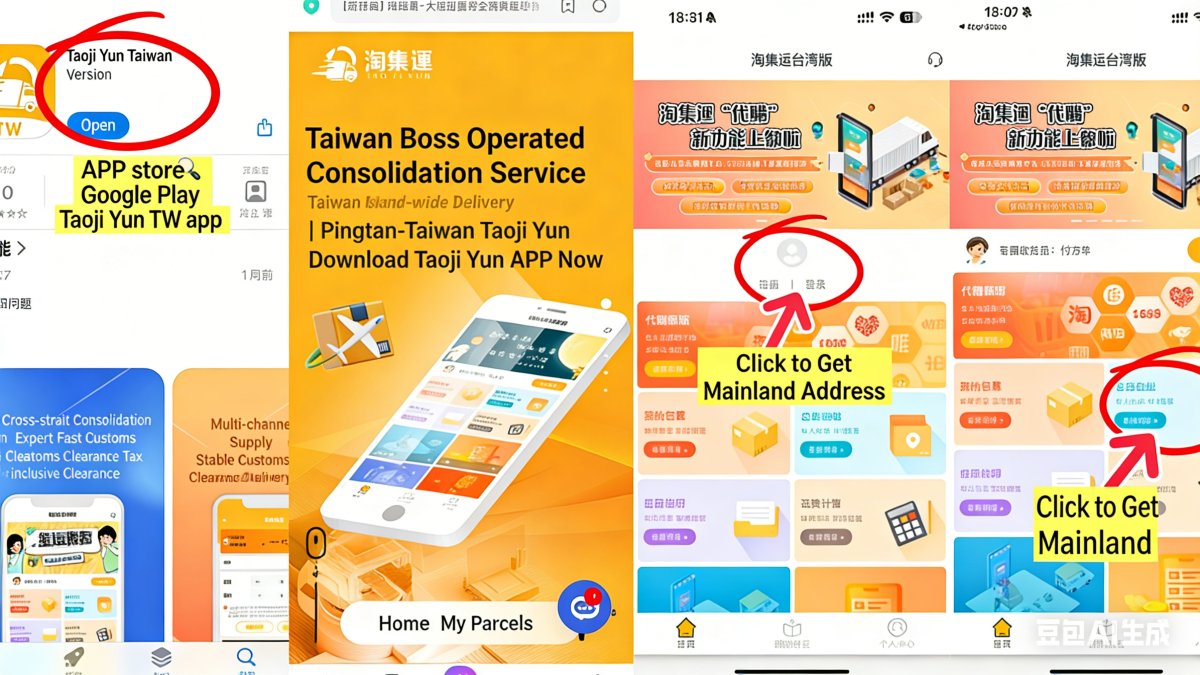
1. Download, register and log in to the Taojiyun TW app
On iPhone, open [Tap to open the App Store and download] and search for the Taojiyun Taiwan app
On Android, [Tap here to download] and download the Taojiyun Taiwan app
2. Tap [Register / Log in】
to get your dedicated mainland address
Step 2
Order on the marketplace and enter the correct delivery details
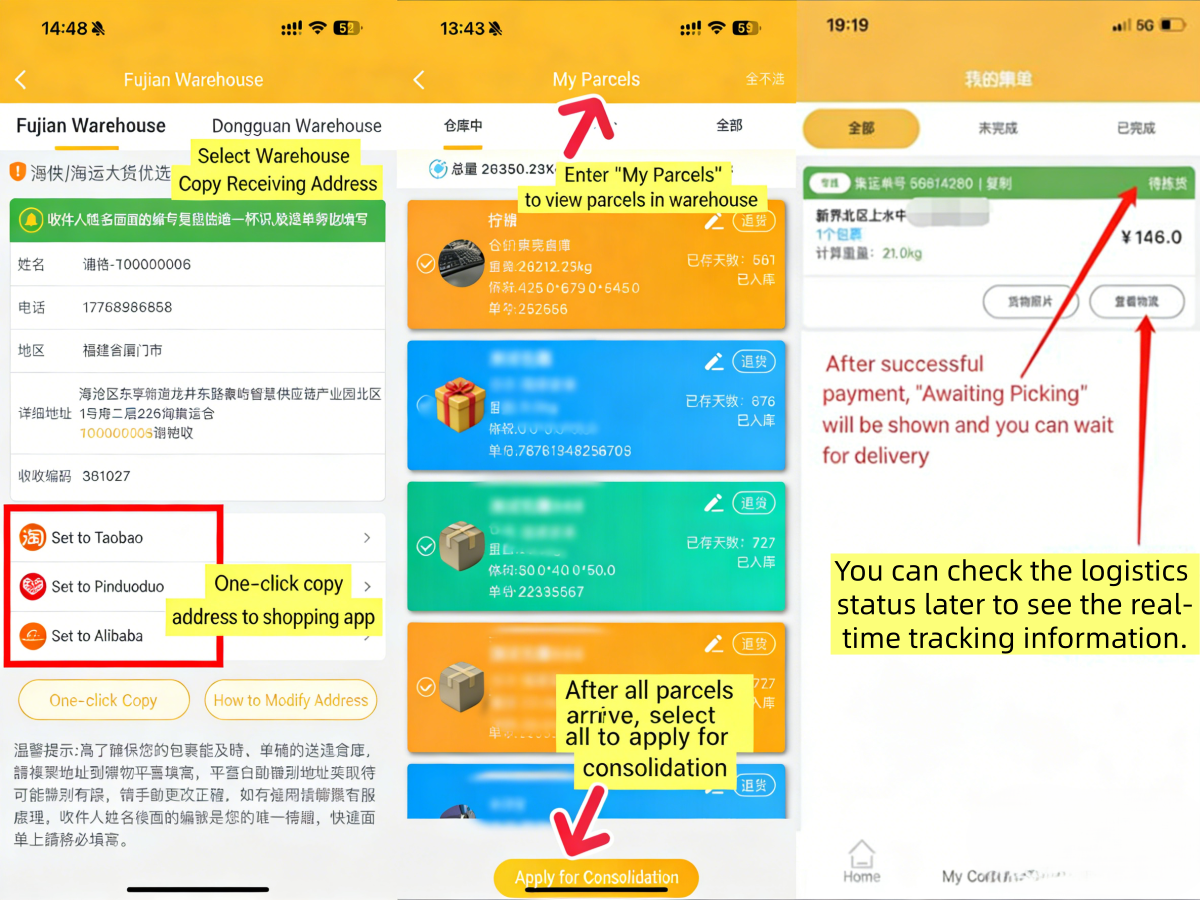
At the checkout page of Taobao / JD.com / Pinduoduo, paste the Taojiyun mainland warehouse address into the delivery address field.
*Using Pinduoduo as an example
Step 3
Parcel checked in — track its status in real time
After the seller ships, the tracking number syncs automatically to the app;
The warehouse scans the parcel in within 1-2 days of receipt;
In the app you can viewthe number of parcels, weight, volume and check-in time。
Step 4
One-tap consolidation and packing to optimise volume.
Once all parcels have arrived, select the ones to combine in the app and submit a consolidation request; our staff providefree consolidation, removal of excess packaging and reinforced packing, cutting down volumetric weight.
Step 5
Enter your Taiwan delivery address
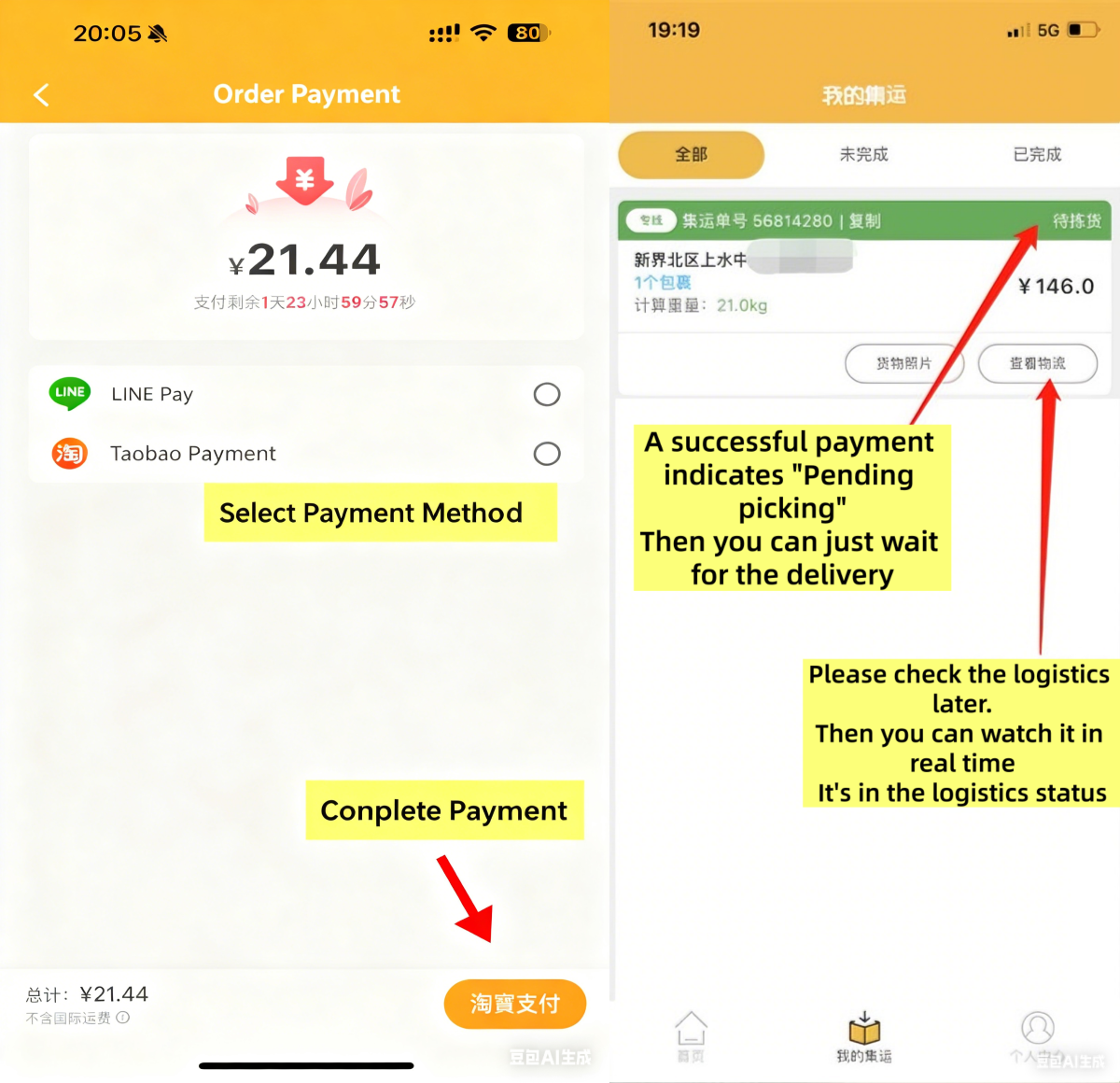
Pay the shipping fee and wait for delivery in Taiwan
Taojiyun Taiwan purchasing-agent guide
(also works when you can't find the item or can't pay)
Go to the Taojiyun purchasing-agent section and paste the product link, or enter the product name and specifications;
Customer service checks whether the item can be purchased and gives you a quote (item price + purchasing service fee);
Once you confirm the quote and pay, the platform places the order with the Taobao or 1688 seller on your behalf;
The goods are shipped to the mainland warehouse, and consolidation is arranged after check-in and verification;
Choose the transport channel to Taiwan and pay the consolidation freight;
After customs clearance they are delivered to your Taiwan address.
Step 1
Tap [Register / Log in] to get your dedicated mainland address
Tap the purchasing mall on the home page
*For manual purchasing >>> [Manual Purchasing Guide】
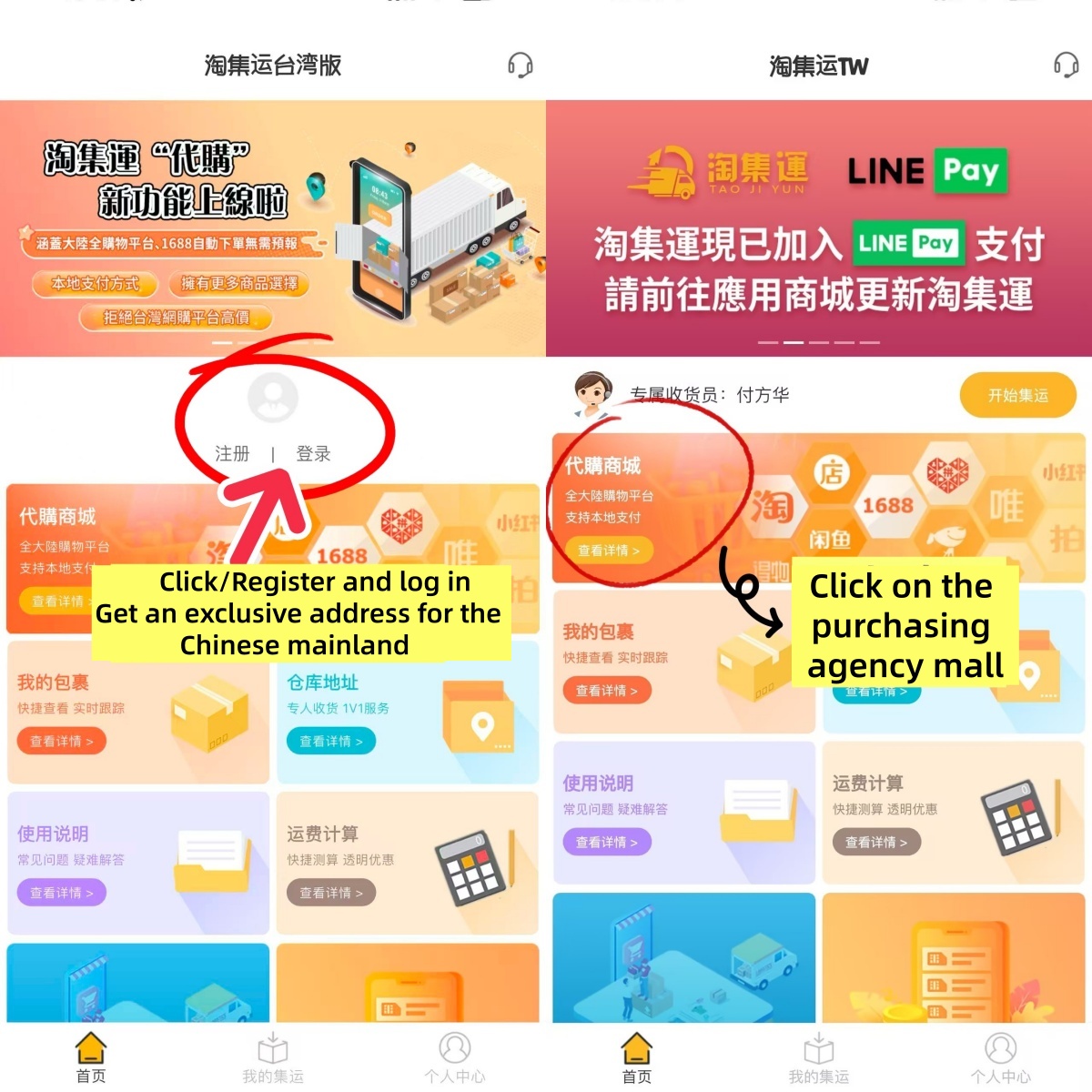
Step 2
Go to the purchasing page and enter the name of the product you want to buy
Tap the cart, select the items you want and apply for checkout
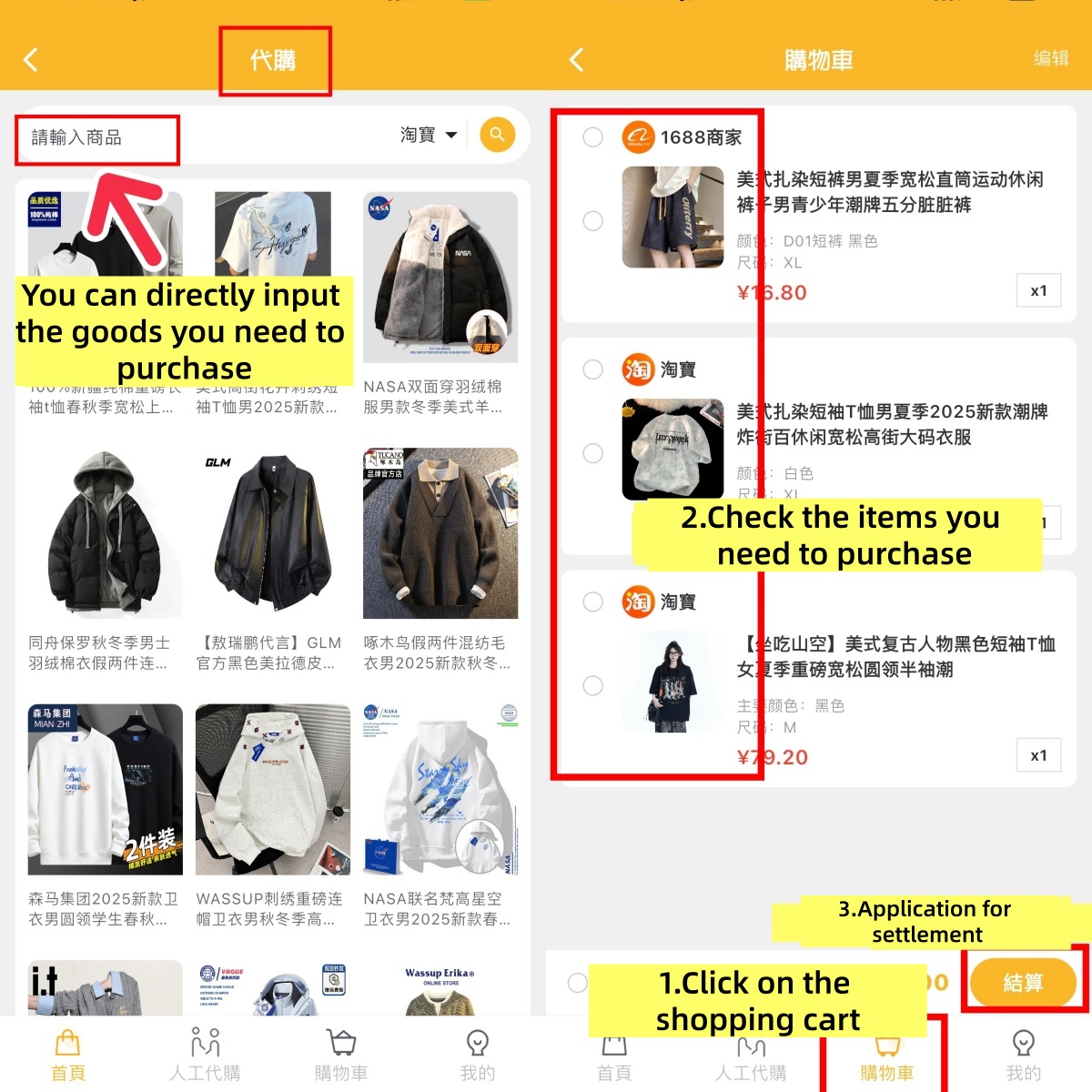
Step 3
Choose the freight channel for your goods; customer service is available for advice
Choose a payment method and complete your order
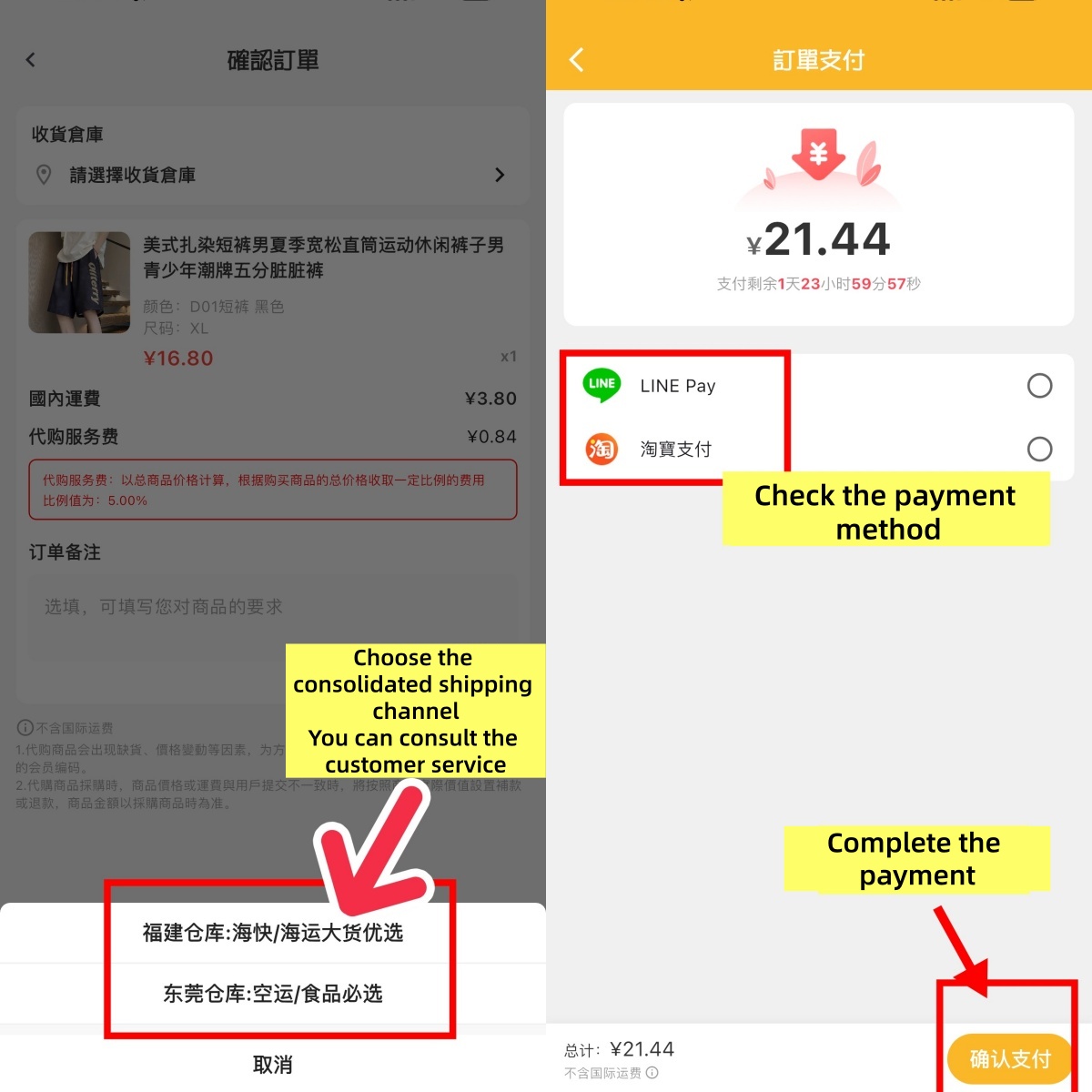
Step 4
Taojiyun ships your order
Items are combined and packed, parcels reinforced, then weighed and shipped
TIP: after shipping you can track the logistics under “Taojiyun App” - “Me” - My Orders
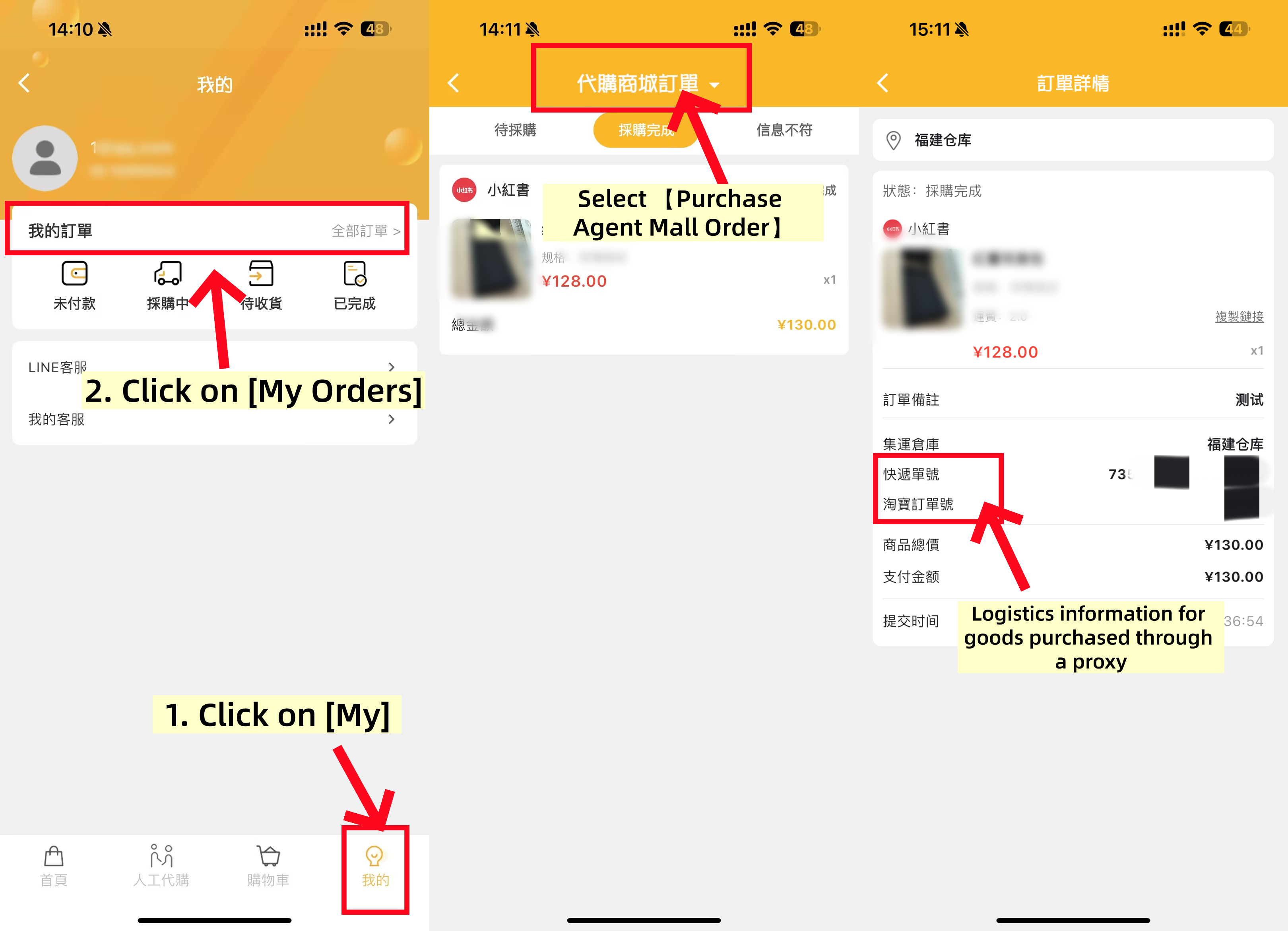
Step 5
Wait for delivery
Check the tracking trail on the parcel list page and follow the delivery progress
TIPS:
International parcels may occasionally run into unexpected situations such as delays, confiscation, taxation, damage or loss. Taojiyun cannot control or prevent the service quality and incidents of third-party carriers and customs authorities in each country.
However, in line with our customer-first service philosophy, Taojiyun will give advance notice based on the conditions of each route and country, and will assist you as far as we can when problems arise.
A: Not necessarily. Switching the IP only solves the search display issue; sellers can still refuse to ship overseas, and the goods must also comply with Taiwan customs rules — prohibited items and compliance issues can both affect whether you receive them.
A: 1688 wholesale goods, homeware, guesthouse consumables, packaging materials and more can all be purchased through the agent. Consolidating several parcels also lowers the shipping cost per item, which suits bulk stocking for small shops in Taiwan. Before ordering, please confirm the item is not on the prohibited list.
A: Commonly overlooked charges include volumetric weight billing, wooden-crate reinforcement and warehouse overtime storage. You can estimate the shipping cost on the platform before consolidation, and watch the free storage period to avoid extra charges.
Taojiyun — Taiwan line contact details
WeChat:
Taojiyun Taiwan consolidation 18814360092
Line:@269trfre
Tap to open Taiwan online customer service:【Online Customer Service】

Beijing Time 2024/10/10 16:09:40
Download APP

Download Taojiyun APP
More convenient query
Customer Service

Scan the QR code to add WeChat
13049844111

Scan the QR code to add WhatsApp
54271072
Line

Scan the QR code to add Line
@269trfre